100 character limit workaround? | Community
Skip to main content
New Participant
Aug 25, 2022 4:12 PM UTC
Solved

100 character limit workaround?

Does anybody have a workaround for the 100 character limit for the PageName when it is in a report? I am using the FreeForm table.

I have URLs that are close to 150-200 characters.

Thanks M

This post is no longer active and is closed to new replies. Need help? Start a new post to ask your question.
Jennifer_Dungan
Jennifer_DunganAccepted solution
Level 2
Aug 25, 2022 9:15 PM UTC

You'll find that most people use an eVar to duplicate their pageName value... this has not only the added bonus of a larger character count, but you can attach it to your clicks/interactions (Adobe removes the pageName from these).


There are a few ways to do this. I assume you are using Adobe Launch.


You can use a Data Element to build out your Page Name values, then use the same Data Element in both your PageName and eVar values.


Or, if you want to minimize the length of your tracking calls, you can actually use "Dynamic Variable Notation" and in your eVar use "D=pageName" (this is case sensitive)


What D= does, is it tells Adobe to take the value of the passed item (pageName, c1, v2, etc) and use it for the value of the current variable.


You may be wondering, "if I use this, will I get the truncated value of pageName"... I am using D=pageName with no issue... the truncation happens after the value duplication.


Sample using the Dynamic Variable Solution:

 

Or Sample just using the Data Element:



For some reason in Launch, the "Duplicate From"
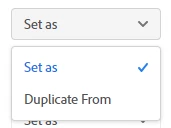
 

Only allows you to choose other eVars when applying to an eVar, or props when applying to a prop.... but essentially the D= is a "duplicate from", you are just setting it manually, instead of using the built-in option.

10 replies

Pablo_Childe
New Participant
Aug 25, 2022 4:44 PM UTC

There is no work around in sense of increasing it in same variable.


I copy to a new evar which then has a limit of 512 if memory serves me.


GLTU

Translate
New Participant
Aug 25, 2022 6:31 PM UTC

Hi Pablo,

I am very very new to Adobe Analytics. Can you tell me how to copy the content to a new evar? Or point me at some information on how to do this.

Very Many Thanks,

Mary

Translate
Jennifer_Dungan
Jennifer_DunganAccepted solution
Level 2
Aug 25, 2022 9:15 PM UTC

You'll find that most people use an eVar to duplicate their pageName value... this has not only the added bonus of a larger character count, but you can attach it to your clicks/interactions (Adobe removes the pageName from these).


There are a few ways to do this. I assume you are using Adobe Launch.


You can use a Data Element to build out your Page Name values, then use the same Data Element in both your PageName and eVar values.


Or, if you want to minimize the length of your tracking calls, you can actually use "Dynamic Variable Notation" and in your eVar use "D=pageName" (this is case sensitive)


What D= does, is it tells Adobe to take the value of the passed item (pageName, c1, v2, etc) and use it for the value of the current variable.


You may be wondering, "if I use this, will I get the truncated value of pageName"... I am using D=pageName with no issue... the truncation happens after the value duplication.


Sample using the Dynamic Variable Solution:


Or Sample just using the Data Element:


For some reason in Launch, the "Duplicate From"


Only allows you to choose other eVars when applying to an eVar, or props when applying to a prop.... but essentially the D= is a "duplicate from", you are just setting it manually, instead of using the built-in option.

Translate