A blank line always shows in the report out of time range because of bounce rate metrics | Community
Skip to main content
晨光赵56058932
New Participant
December 1, 2019
Solved

A blank line always shows in the report out of time range because of bounce rate metrics

  • December 1, 2019
  • 3 replies
  • 3319 views

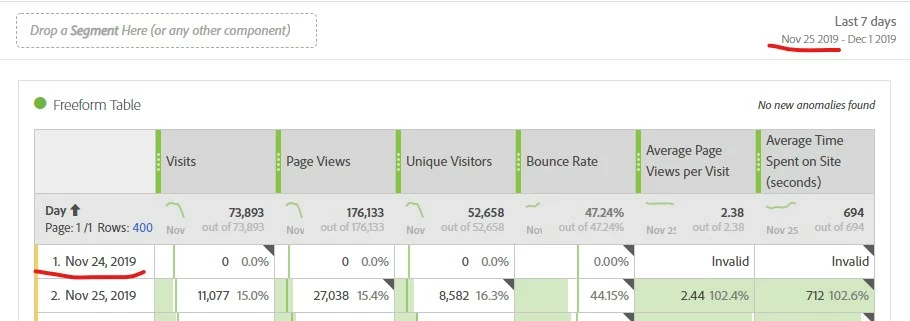
When I choose the bounce rate metrics, a blank line always shows in the report and out of the selected time range. How can I fix this in the report?
This post is no longer active and is closed to new replies. Need help? Start a new post to ask your question.
Best answer by Hyder_Ziaee

Bounce rate is calculated based on Bounces/Entries. Since the visit can span over two days, with the entry on the previous day (24th), you will see the extra line show up.

You can add bounces and Entries to the table to see how bounce rate is calculated and how many entries are on the previous day

3 replies

Hyder_Ziaee
Hyder_ZiaeeAccepted solution
Employee
December 2, 2019

Bounce rate is calculated based on Bounces/Entries. Since the visit can span over two days, with the entry on the previous day (24th), you will see the extra line show up.

You can add bounces and Entries to the table to see how bounce rate is calculated and how many entries are on the previous day

晨光赵56058932
New Participant
December 1, 2019

Why the Nov 24 data come out in the report from Nov 25 to Dec 1 report?

Asheesh_Pandey
New Participant
December 1, 2019

you should be able to fix it via column settings. To access Column Settings, drag a Freeform Table to the project, then click the gear icon in the column heading. Column settings

To fix - Enable Interpret zero as no value - Determines for cells with a 0 value, determines whether to show a 0 or a blank cell.