Adobe Omniture, not all tracking codes are tracking | Community
Skip to main content
June 28, 2017
Solved

Adobe Omniture, not all tracking codes are tracking

  • June 28, 2017
  • 1 reply
  • 908 views

Hello All,

I was first made aware of this problem several months ago. Apparently not all of the tracking codes are tracking correctly if they are tracking at all. For example, I have the shortened link: http://lnv.gy/2tPvHPU which expanded is 'http://www3.lenovo.com/ca/en/landingpage/promotions/weekly-sale/lenovo-laptops/?ls=LWY_18Q1_CA_RMALL_ALL_ALL_MED_BN_TwitterAlwaysOn&sf=70114000002OH6h&elqCampaignID=3440?CID=ca:lenovosocial:lbkifr&linkId=38955463'

According to this link, I should see ca:lenovosocial:lbkifr in the list of tracking codes. I do not. Why?

Any insight would be greatly appreciated, as this has been an ongoing problem, and no one knows what do do about it.
This post is no longer active and is closed to new replies. Need help? Start a new post to ask your question.
Best answer by Hyder_Ziaee

Hi Robert,

The URL parameter CID is not set correctly. It should have been appended to the URL using a '&', however, it was done using '?'

Here is the URL broken up in parts by different parameters

http://www3.lenovo.com/ca/en/landingpage/promotions/weekly-sale/lenovo-laptops/

?ls=LWY_18Q1_CA_RMALL_ALL_ALL_MED_BN_TwitterAlwaysOn

&sf=70114000002OH6h

&elqCampaignID=3440

?CID=ca:lenovosocial:lbkifr

&linkId=38955463

The first parameter in the URL should start with '?', after that each parameter needs to be separated by '&'

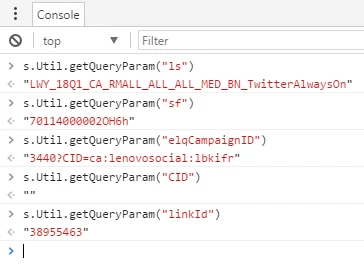
You can also check from the console

You can see that the CID value is not being treated as a separate parameter but a part of the previous parameter 'elqCampaignID'

Now try changing the second '?' in the URL to '&', and you should be able to track it correctly

http://www3.lenovo.com/ca/en/landingpage/promotions/weekly-sale/lenovo-laptops/?ls=LWY_18Q1_CA_RMALL_ALL_ALL_MED_BN_TwitterAlwaysOn&sf=70114000002OH6h&elqCampaignID=3440&CID=ca:lenovosocial:lbkifr&linkId=38955463

http://www3.lenovo.com/ca/en/landingpage/promotions/weekly-sale/lenovo-laptops/?ls=LWY_18Q1_CA_RMALL_ALL_ALL_MED_BN_TwitterAlwaysOn&sf=70114000002OH6h&elqCampaignID=3440?CID=ca:lenovosocial:lbkifr&linkId=38955463http://www3.lenovo.com/ca/en/landingpage/promotions/weekly-sale/lenovo-laptops/?ls=LWY_18Q1_CA_RMALL_ALL_ALL_MED_BN_TwitterAlwaysOn&sf=70114000002OH6h&elqCampaignID=3440?CID=ca:lenovosocial:lbkifr&linkId=38955463

1 reply

Hyder_Ziaee
Hyder_ZiaeeAccepted solution
Employee
June 29, 2017

Hi Robert,

The URL parameter CID is not set correctly. It should have been appended to the URL using a '&', however, it was done using '?'

Here is the URL broken up in parts by different parameters

http://www3.lenovo.com/ca/en/landingpage/promotions/weekly-sale/lenovo-laptops/

?ls=LWY_18Q1_CA_RMALL_ALL_ALL_MED_BN_TwitterAlwaysOn

&sf=70114000002OH6h

&elqCampaignID=3440

?CID=ca:lenovosocial:lbkifr

&linkId=38955463

The first parameter in the URL should start with '?', after that each parameter needs to be separated by '&'

You can also check from the console

You can see that the CID value is not being treated as a separate parameter but a part of the previous parameter 'elqCampaignID'

Now try changing the second '?' in the URL to '&', and you should be able to track it correctly

http://www3.lenovo.com/ca/en/landingpage/promotions/weekly-sale/lenovo-laptops/?ls=LWY_18Q1_CA_RMALL_ALL_ALL_MED_BN_TwitterAlwaysOn&sf=70114000002OH6h&elqCampaignID=3440&CID=ca:lenovosocial:lbkifr&linkId=38955463

http://www3.lenovo.com/ca/en/landingpage/promotions/weekly-sale/lenovo-laptops/?ls=LWY_18Q1_CA_RMALL_ALL_ALL_MED_BN_TwitterAlwaysOn&sf=70114000002OH6h&elqCampaignID=3440?CID=ca:lenovosocial:lbkifr&linkId=38955463http://www3.lenovo.com/ca/en/landingpage/promotions/weekly-sale/lenovo-laptops/?ls=LWY_18Q1_CA_RMALL_ALL_ALL_MED_BN_TwitterAlwaysOn&sf=70114000002OH6h&elqCampaignID=3440?CID=ca:lenovosocial:lbkifr&linkId=38955463