Adobe Warehouse to FTP | Community
Skip to main content
New Participant
August 1, 2017
Solved

Adobe Warehouse to FTP

  • August 1, 2017
  • 1 reply
  • 1077 views

I scheduled a data warehouse request on daily basis to be sent to FTP.

To act as a control, I made a one-off request as well (both in same dimension, metrics and period).

However, all scheduled request have returned as failed while one-off request always works.

I needed the data on a daily basis for further appending purpose.

Is there any possible issue that I have overlooked to cause the failure in scheduled request??

This post is no longer active and is closed to new replies. Need help? Start a new post to ask your question.
Best answer by pankajbagga_sme

qfKI​ : Hi,  Yes that is possible. Below steps would help:

-- Login to SC/Omniture and navigate to Tools-->>Data Warehouse

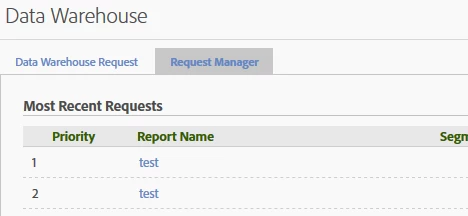
-- You would see an option Request Manager at the top just below the header "Data Warehouse"

-- Once on request manager, search for your reports by report name or login

-- The status would be on the reports with the details. Click on hyperlink on Report Name

-- You would be able to see error for the report over there

p.s. Screen Shots as attached

Common Errors: FTP details incorrect, sFTP instead of FTP, segment applied incompatible with DW, issue while processing data.

1 reply

pankajbagga_smeAccepted solution
New Participant
August 5, 2017

qfKI​ : Hi,  Yes that is possible. Below steps would help:

-- Login to SC/Omniture and navigate to Tools-->>Data Warehouse

-- You would see an option Request Manager at the top just below the header "Data Warehouse"

-- Once on request manager, search for your reports by report name or login

-- The status would be on the reports with the details. Click on hyperlink on Report Name

-- You would be able to see error for the report over there

p.s. Screen Shots as attached

Common Errors: FTP details incorrect, sFTP instead of FTP, segment applied incompatible with DW, issue while processing data.