bot exclusion rules | Community
Skip to main content
Level 4
Aug 12, 2022 1:45 PM UTC
Solved

bot exclusion rules

How to enable bot exclusion in the report suite? And, it will take care of all the standard bots? 


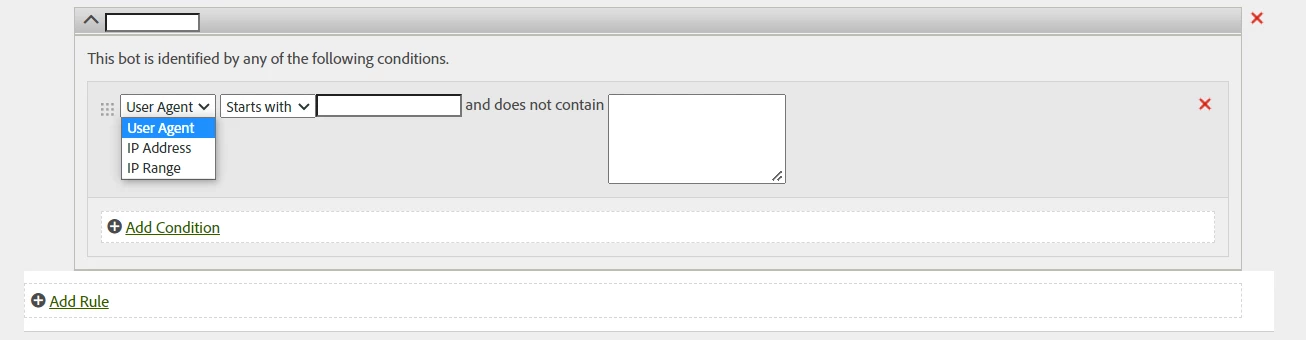
What if we want to add additional bot exclusion logic, where do we add that?

This post is no longer active and is closed to new replies. Need help? Start a new post to ask your question.
Jennifer_Dungan
Jennifer_DunganAccepted solution
Level 2
Aug 12, 2022 9:38 PM UTC

Hi, 


To Access Bot Exclusion Rules, you need to go to Admin > Report Suites.

Choose 1 or Many Report Suites that you want to modify

Then go to Edit Settings > General > Bot Rules

(Adobe May prompt you to choose 1 of the selected suites as your "template")


Standard Bot Exclusion Rules can be applied simply by checking "Enable IAB Bot Filtering Rules"


To add your own custom rules, click "Add Rule", you can create multiple rules:


Hope this helps


2 replies

Jennifer_Dungan
Jennifer_DunganAccepted solution
Level 2
Aug 12, 2022 9:38 PM UTC

Hi, 


To Access Bot Exclusion Rules, you need to go to Admin > Report Suites.

Choose 1 or Many Report Suites that you want to modify

Then go to Edit Settings > General > Bot Rules

(Adobe May prompt you to choose 1 of the selected suites as your "template")


Standard Bot Exclusion Rules can be applied simply by checking "Enable IAB Bot Filtering Rules"


To add your own custom rules, click "Add Rule", you can create multiple rules:


Hope this helps


Translate
xcode2295Author
Level 4
Aug 15, 2022 3:50 PM UTC

Thank you! This is super helpful 🙂

Translate