Button tracking using data layer manager | Community
Skip to main content
New Participant
September 20, 2022
Solved

Button tracking using data layer manager

  • September 20, 2022
  • 2 replies
  • 3004 views

Hi everybody!

I´ve been setting up our buttons´ clicks using the data layer manager. Because our site is super simple, our dev created only event data layer and I configured each one (there are only 7) as a rule and its own event on the report suite. 

I've been testing on our dev environment and it seems we are getting the data. However, because I did that as an event, I have to select each event and use it on the metric field. (as bellow)



For our app we did both, set up as an event and also as a processing rule, this way I can see all the actions in a table. 
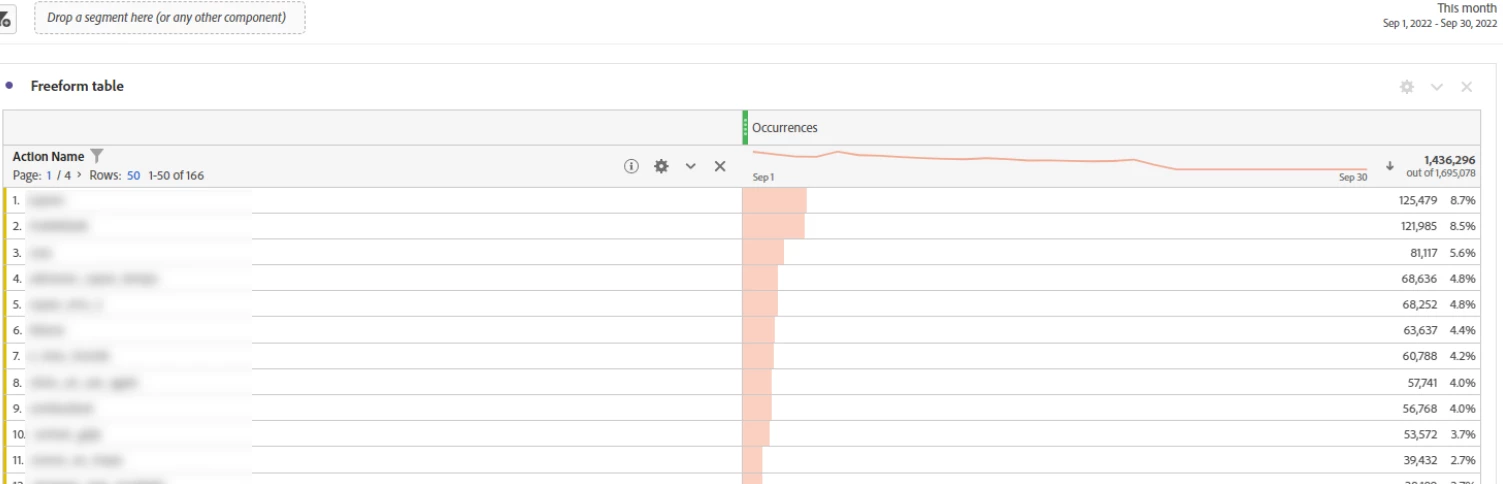


How can I do that in this case? Would I also have to create a data element for it and also an evar?

Thank you in advance

This post is no longer active and is closed to new replies. Need help? Start a new post to ask your question.
Best answer by Pablo_Childe

You may also want to look at activity map tracking.


1 no extra dev work out of box

2 can allow you to do advanced mappings links/regions reporting

3 allows you to due near realtime (basic heatmaps) on page vis browser extension


Then just use custom links when coding/pae doesnt auto track activity map...


GLTU

2 replies

Pablo_Childe
Pablo_ChildeAccepted solution
New Participant
September 20, 2022

You may also want to look at activity map tracking.


1 no extra dev work out of box

2 can allow you to do advanced mappings links/regions reporting

3 allows you to due near realtime (basic heatmaps) on page vis browser extension


Then just use custom links when coding/pae doesnt auto track activity map...


GLTU

Jennifer_Dungan
New Participant
September 20, 2022

I absolutely second this.. I only track the really important clicks (like path to subscription), other than that Activity Map all the way.


Here's a great blog post on the subject:

https://www.fullstackanalyst.io/blog/adobe-analytics/understanding-and-getting-the-most-out-of-activity-map-in-adobe-analytics/


Jennifer_Dungan
New Participant
September 20, 2022

Adobe "click" actions have a default parameter called Link Name (it will show up in Workspace as "Custom Link")


In your app, your trackActions also pass a value that will populate this field (though it should be noted that the app will append "AMACTION:" to the beginning of the custom link value (there is nothing you can do to prevent this 😞 )


The Occurrences metric will trigger on all page views and actions automatically.. so if you have Custom Link set, you should be able to see it like your App table already, just use "Custom Link" as your breakdown and Occurrences as the metric (assuming of course that you set unique values for your Custom Links when you did your tracking)


However, if you have set up a custom eVar or Prop called "Action Name" you should be able to set this value in Adobe Launch on your clicks, or map it in with processing rules (it really comes down to personal preference). 


You can set up any props, eVars, events, etc etc that you want on your button clicks/actions. Just like page views, you can populate any correlation values that you need to give your action insights.


You can use both solutions if you choose.. a custom event for each button, and the occurrences (just like you have for your app) there are many ways to accomplish this... but it's hard to rally give direct advice without seeing your implementation, but hopefully these tips help, and if you need more advice, please let me know.

Jennifer_Dungan
New Participant
September 20, 2022

I forgot to mention, if you are sending your app and website to the same suite, you can use the same eVars, etc... this is what I do... I do however have prop that I set to indicate the platform (I include this on all hits - page views and actions), so that I can easily create segments to isolate web from app when I need to, but have everything roll up into a one consolidated report at other times.