Calculated Metrics not available in Report builder | Community
Skip to main content
New Participant
Jun 10, 2020 4:21 PM UTC
Solved

Calculated Metrics not available in Report builder

We are experiencing issue with metrics not always being available in Report Builder, especially when using a virtual report suite. Sometime metrics are missing in report build and calculated metrics can be there sometimes for a main report suite but not for a virtual report suite based on that main. Why is that?
This post is no longer active and is closed to new replies. Need help? Start a new post to ask your question.
saumyag24417044Accepted solution
Level 4
Jun 16, 2020 5:38 AM UTC

In Report Builder, when a Virtual Report Suite is selected to fetch data, only metrics available directly under the Virtual Report Suite are shown.

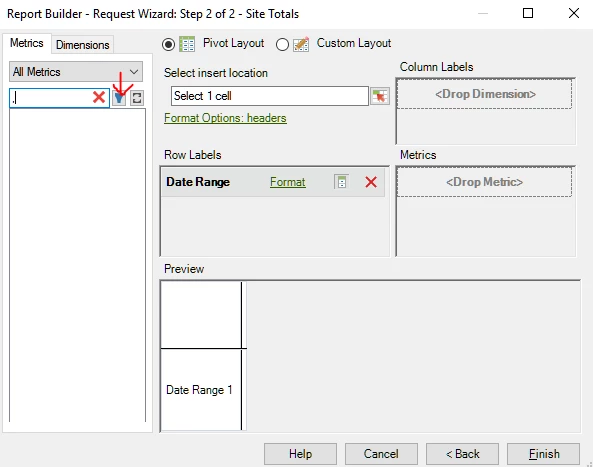
To access the Calculated Metrics created under specific report suite, click on the filter icon for Metrics and then select the Report Suite under which it is created. This will make the same available in the list:


Hope this helps!


Thanks,

Saumya

2 replies

Level 4
Jul 14, 2020 9:43 AM UTC
@mnask - Did the answer provided in my last comment help?
Translate
saumyag24417044Accepted solution
Level 4
Jun 16, 2020 5:38 AM UTC

In Report Builder, when a Virtual Report Suite is selected to fetch data, only metrics available directly under the Virtual Report Suite are shown.

To access the Calculated Metrics created under specific report suite, click on the filter icon for Metrics and then select the Report Suite under which it is created. This will make the same available in the list:


Hope this helps!


Thanks,

Saumya

Translate