@jennifer_dungan Thank you so much for the detailed solution.
I choose to use the Classification rule builder for internal campaign id classification:
Whenever we have an internal Campaign with a new value like below instead of gs: google services if we have ys: yahoo services, we have to add a Rule like below to classify it. Is my understanding correct?
([a-zA-Z0-0]*)_([a-zA-Z0-0]*)_(ys)-([a-zA-Z0-0]*)_([a-zA-Z0-0]*)
External Campaigns:
Once the Classifications are set up like the below for the Campaign variable (Tracking code v0) instead of the Internal campaign evar.
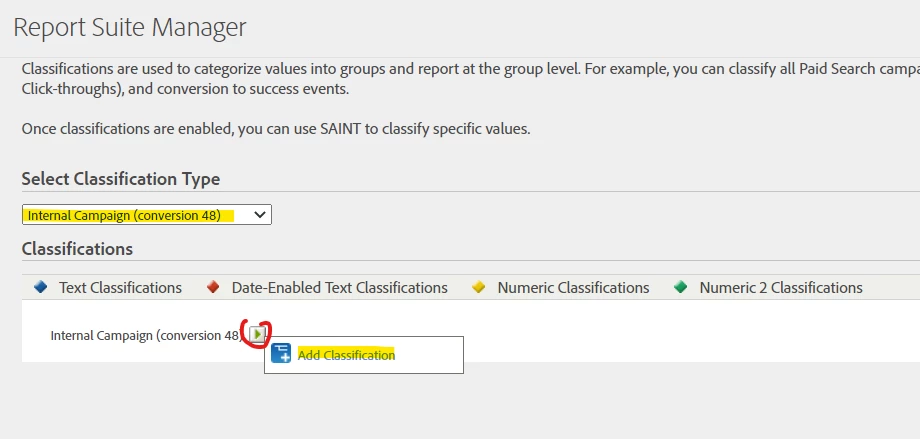
If we have multiple campaign ID taxonomies for various marketing channels, How can I set up the classifications on Campaign Variable with different CID taxonomies? As we can only apply one Test rule set in the classification rule builder per variable , how to handle callasifications with this scenario?
Email: cmpid = region_campaign_country_business_medium_source_content_parent_asset_term
Paid search: cmpid = region_campaign_medium__content_parent_term (more relevant to ads info)
display: network_region_campaign_date
Ok, I'll break down the above to address each question:
if we have ys: yahoo services, we have to add a Rule like below to classify it. Is my understanding correct?
([a-zA-Z0-0]*)_([a-zA-Z0-0]*)_(ys)-([a-zA-Z0-0]*)_([a-zA-Z0-0]*)
Yes... though I think this regex has a typo... should be 0-9 not 0-0, but yeah, like that... the generic rule first to catch unexpected values, then the specific "gs", "ys", etc values after to "rewrite" values to something more readable 🙂 (also feel free to experiment with that regex if you need to account for special characters... I assume there are none... you would know better 🙂
External Campaigns:
Once the Classifications are set up like the below for the Campaign variable (Tracking code v0) instead of the Internal campaign evar.
Actually, you can do classifications on your v0 (which actually shows as "campaign" in the dropdown:
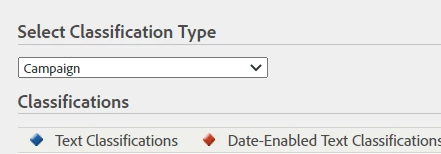
But there is also a special Marketing Channel Classifications section as well:
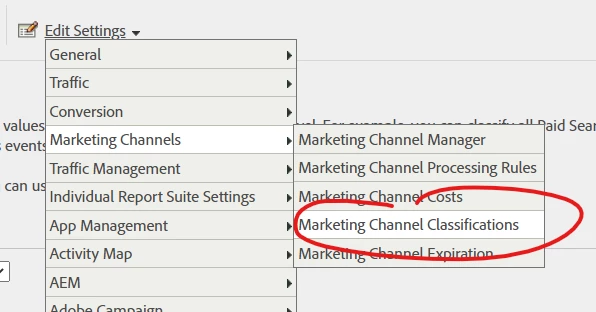
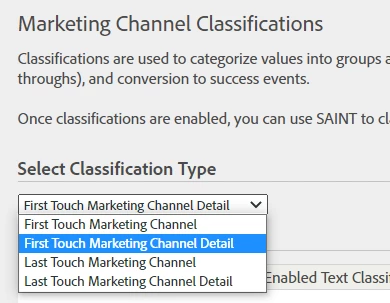
Your s.campaign (v0) and your Marketing Channels may be set to different expiry times, so it makes sense that you can classify these differently 🙂
The Marketing Channel Classifications also allow you to classify both First and Last Touch, and the Channel / Detail.
Now, classifying different taxonomies
Email: cmpid = region_campaign_country_business_medium_source_content_parent_asset_term
Paid search: cmpid = region_campaign_medium__content_parent_term (more relevant to ads info)
display: network_region_campaign_date
This isn't as hard as it seems.. for your internal, I assumed the same pattern.. but you can actually set up different regex to match your rules (you might have to get creative, and play with the order of the rules to ensure that your samples come out correctly (when you run a test).
So if I am not mistaken, your email campaigns have 10 parts, your paid search has 7 parts (one of those areas is either optional or always blank), and your display has 4 parts...
So you should be able to create a regex for processing rules with 10 sections
something like
([a-zA-Z0-0]*)_([a-zA-Z0-0]*)_([a-zA-Z0-0]*)_([a-zA-Z0-0]*)_([a-zA-Z0-0]*)_([a-zA-Z0-0]*)_([a-zA-Z0-0]*)_([a-zA-Z0-0]*)_([a-zA-Z0-0]*)_([a-zA-Z0-0]*)
Process the items with 10 last, since I believe the ones with less may still match the beginning...
For your 7 sections:
([a-zA-Z0-0]*)_([a-zA-Z0-0]*)_([a-zA-Z0-0]*)_([a-zA-Z0-0]*)_([a-zA-Z0-0]*)_([a-zA-Z0-0]*)_([a-zA-Z0-0]*)
And for your 4 sections:
([a-zA-Z0-0]*)_([a-zA-Z0-0]*)_([a-zA-Z0-0]*)_([a-zA-Z0-0]*)
So let's put a sample together.. ignore the fact that I am dumping everything into 2 test classifications.. you can even create some generic classifications that look for "10 items taxonomy", apply "email" as a simple lookup, and "7 items" apply "paid search" (I will show that as a sample to give you ideas on what you can do, if you choose)
Note: Since I don't have start and end added to the regex (I could though), I will start with "4 item" rules (so that even when the rules match the longer strings, they will later be overwritten), then I will do the 7 part rules, then I will do the remaining 10 items rules (but you could easily add ^ to the start and $ to the end (^([a-zA-Z0-0]*)_([a-zA-Z0-0]*)_([a-zA-Z0-0]*)_([a-zA-Z0-0]*)$) to ensure that it's an exact match:
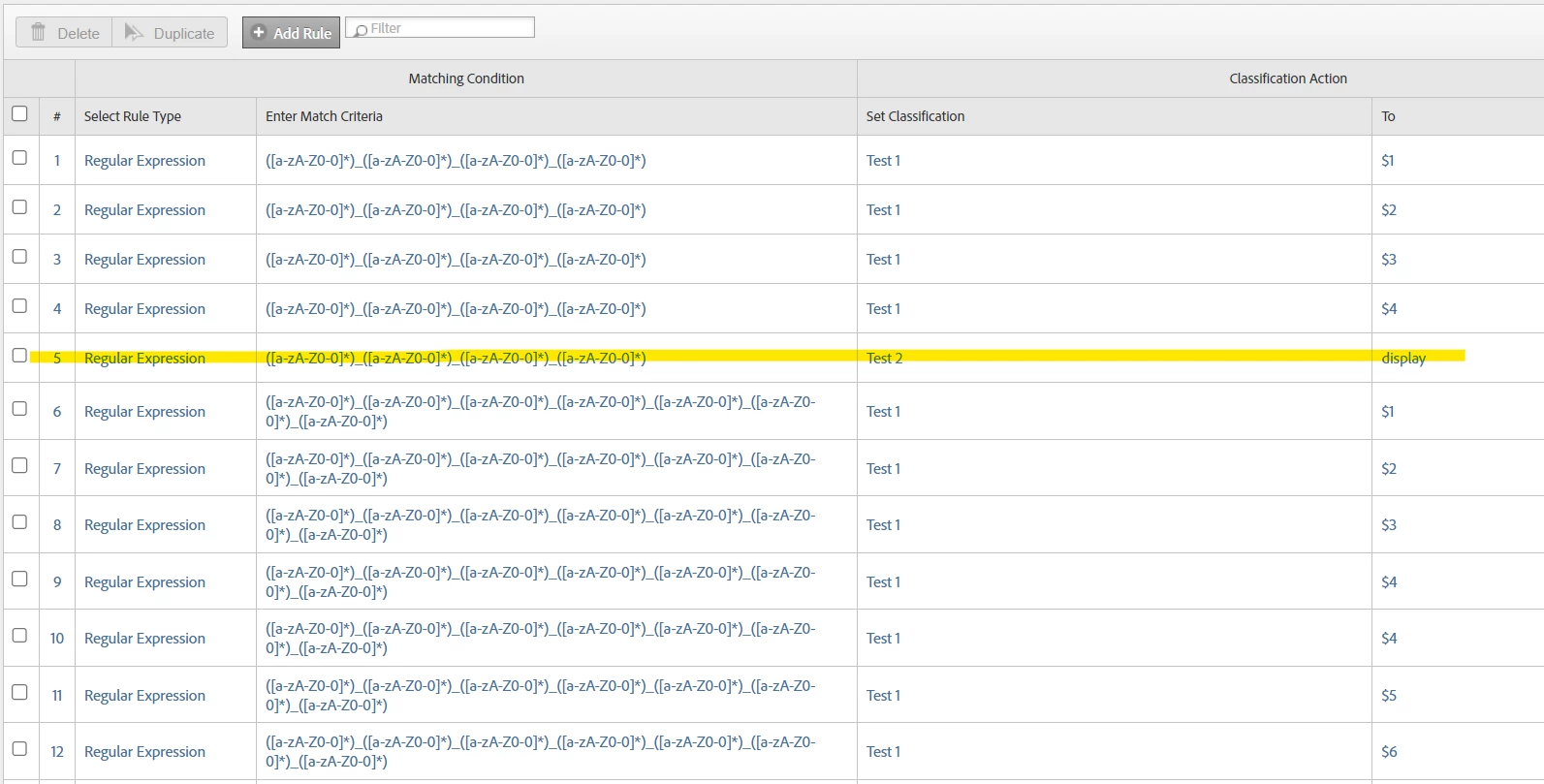
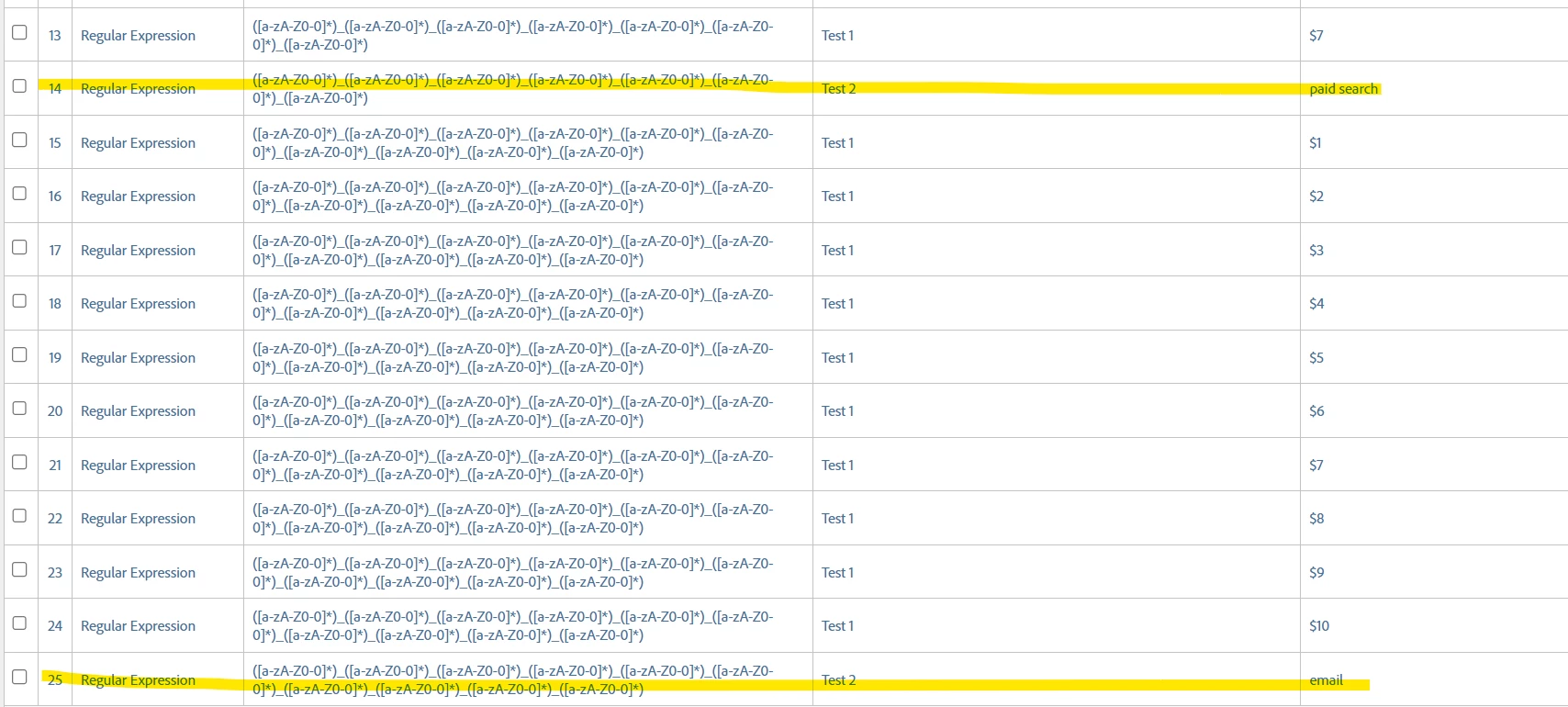
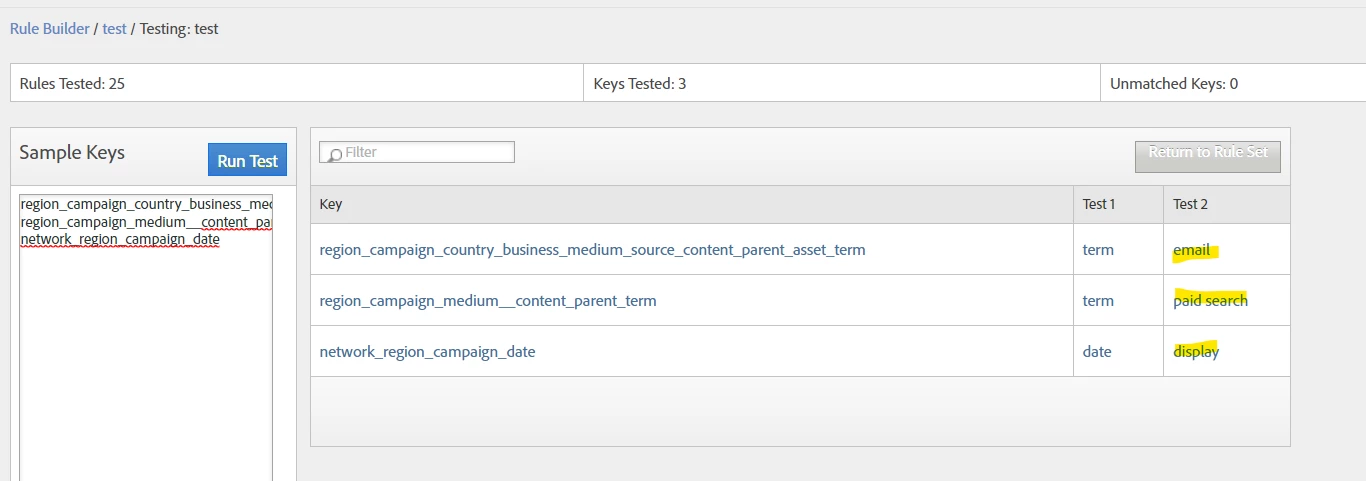
^ Ignoring the fact that I dumped most of my rules into Test 1 instead of proper classifications (so I kept overwriting the values), you can see that my highlighted sample rows, populating Test 2 with "email" or "paid search" or "display" actually came out correctly based on looking for a specific number of parts, and having them process in the correct order...
Now, IF you have two different types of campaign taxonomies, and they have the same number of values being passed, hopefully one of the values can help you determine a difference between them, and you can build that check into the regex to separate them out from one another.
Testing your rules is very important, and I would suggest testing with both sample data, like I did.. and get some real collected data and add into the Rule Tester to make sure that everything processes as expected.