Can I use Total Time Spent metric in API 1.4 warehouse type report? | Community
Skip to main content
Level 2
Jul 12, 2023 11:09 AM UTC
Solved

Can I use Total Time Spent metric in API 1.4 warehouse type report?

Hello!

I'm trying to create a warehouse report with Total Time Spent (totaltimespent) metric using API 1.4 but get the error:

"error":"metric_not_supported_in_warehouse","error_description":"Metric \\"totaltimespent\\" not supported in warehouse requests","error_uri":"https:\\/\\/marketing.adobe.com\\/developer\\/en_US\\/documentation\\/analytics-reporting-1-4\\/metrics"

Does it mean Total Time Spent metric isn't supported in warehouse report OR it has some different name?

Thanks in advance!

This post is no longer active and is closed to new replies. Need help? Start a new post to ask your question.
Jennifer_Dungan
Jennifer_DunganAccepted solution
Level 2
Jul 13, 2023 3:42 PM UTC

Not to throw your whole process into disarray... but maybe this is something you should consider using API 2.0 for? I say this because if you are getting "metric not supported" it seems like this isn't something you can overcome using that version of the API....


Workspaces all use version 2.0, so if the metric appears there it should return via the API.


 A little known fact about building API 2.0 calls, is that you can get the API calls used to build your Workspaces using the Debug mode, then you can tweak the API calls if needed.


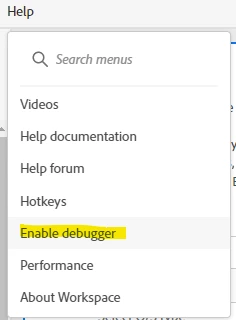
First enable Debug mode:


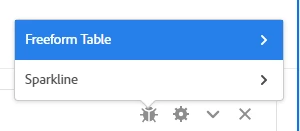
This will add a new icon to your freeform tables:


When you click on this, it will have a popup asking if you want to get the call for the freeform or the sparkline.. choose freeform table:


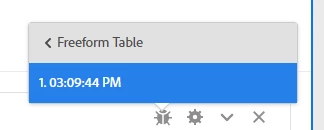
Now you will be presented with times for each API call:


When you select the time(s), it will open a new window that will show the API call in multiple formats including JSON and CURL, etc.


Maybe this will have better luck getting the Total Time Spent? Or maybe that metric truly isn't available this way? I don't use the Time Metrics in Adobe...

4 replies

Jennifer_Dungan
Jennifer_DunganAccepted solution
Level 2
Jul 13, 2023 3:42 PM UTC

Not to throw your whole process into disarray... but maybe this is something you should consider using API 2.0 for? I say this because if you are getting "metric not supported" it seems like this isn't something you can overcome using that version of the API....


Workspaces all use version 2.0, so if the metric appears there it should return via the API.


 A little known fact about building API 2.0 calls, is that you can get the API calls used to build your Workspaces using the Debug mode, then you can tweak the API calls if needed.


First enable Debug mode:


This will add a new icon to your freeform tables:


When you click on this, it will have a popup asking if you want to get the call for the freeform or the sparkline.. choose freeform table:


Now you will be presented with times for each API call:


When you select the time(s), it will open a new window that will show the API call in multiple formats including JSON and CURL, etc.


Maybe this will have better luck getting the Total Time Spent? Or maybe that metric truly isn't available this way? I don't use the Time Metrics in Adobe...

Translate
Level 2
Jul 14, 2023 9:12 AM UTC

That's exactly what I was trying to grab report request from UI. Total Time Spent has the same id I try to use in my report request. Obviously, warehouse type of report within API 1.4 doesn't support this metric. I decided to keep using my report with source=standard.

Thank you Jennifer for the suggestion!

Translate
FarazHusain
Employee
Jul 12, 2023 11:33 AM UTC

Hey @andrii2023 related to Time spent this document states which metrics are supported in data warehouse - https://experienceleague.adobe.com/docs/analytics/components/metrics/time-spent.html?lang=en

Total seconds spent is something available in Data Warehouse and I believe the ID for the same is - itemtimespent

Translate
Level 2
Jul 12, 2023 11:46 AM UTC

Thank you @farazhusain, I read this doc before and it says that Total Time Spent is available in Date Warehouse. And indeed it works in Adobe Analytics Data Warehouse UI to request a report.

But I use API requests in my application and got the error.


Also tried to use "itemtimespent" name but the error is 

metric_id_invalid


Translate