Challenge is track clicks (“exit links”) on URLs that aren’t being tracked by Adobe Omniture | Community
Skip to main content
New Participant
July 26, 2017
Solved

Challenge is track clicks (“exit links”) on URLs that aren’t being tracked by Adobe Omniture

  • July 26, 2017
  • 3 replies
  • 2686 views

Hi,

We’re using Adobe Omniture.

I need to track clicks engagement for this page - http://www.netapp.com/us/cloud-marketplace/index.aspx

The main challenge is track clicks (Adobe Omniture is very complicated measuring that metric).

Need your advice how to measure clicks (“exit links”) on URLs that aren’t being tracked by Adobe Omniture.

For example (see below image 1): we have link to registration page https://cloud.netapp.com/ebook-all-cloud-lp (asset is “AllCloud benchmarking eBook”).
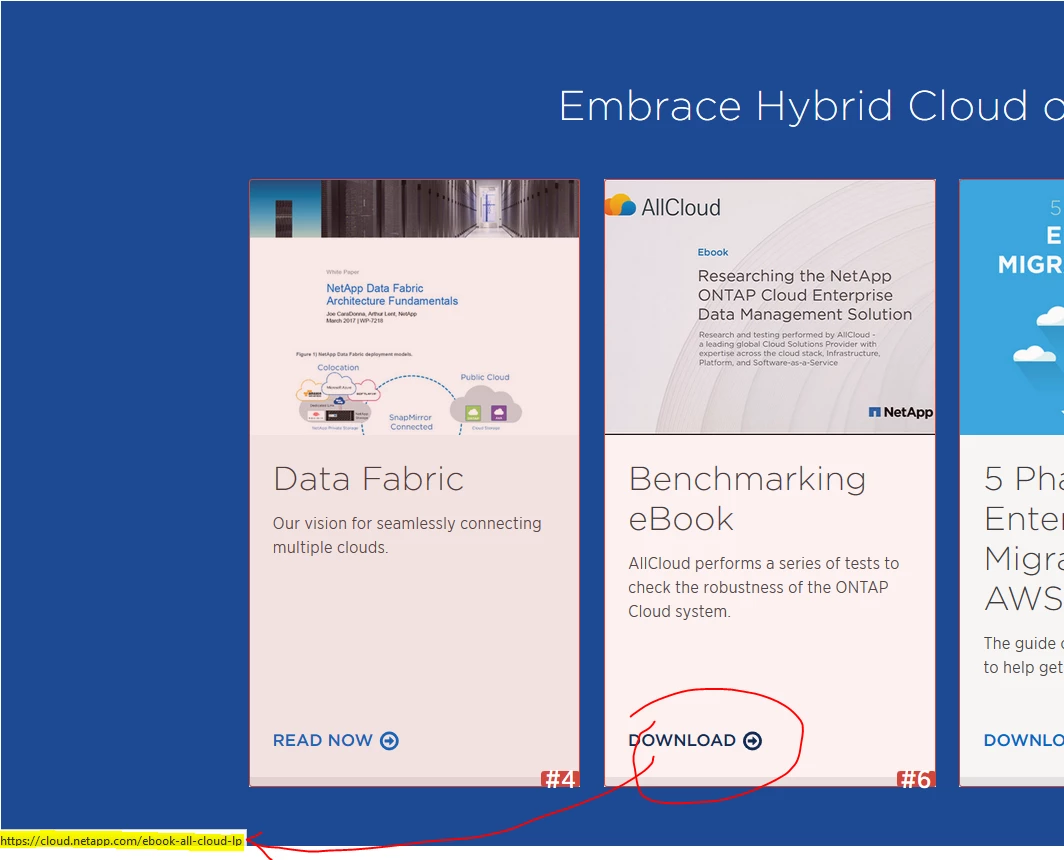
I need this report (if possible) on a workspace (see image 2 below):
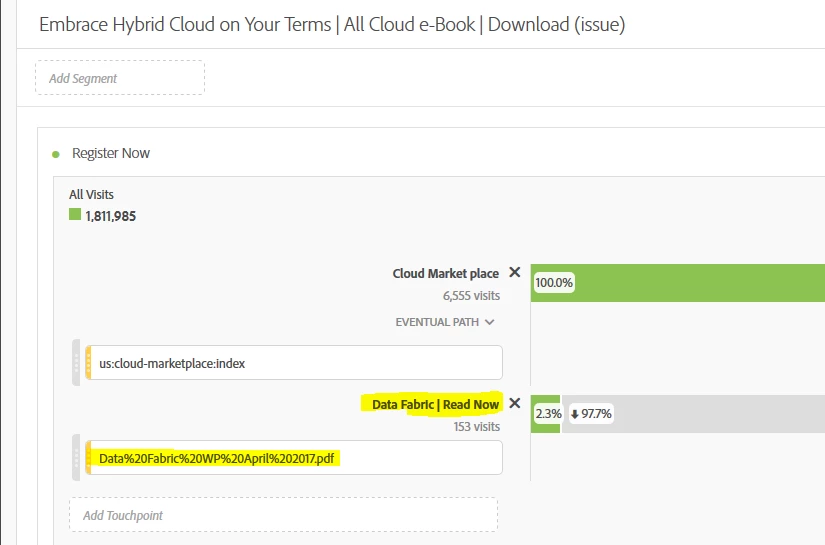
Thanks,

Guy

This post is no longer active and is closed to new replies. Need help? Start a new post to ask your question.
Best answer by EricMatisoff

Hi Guy,

Unfortunately it looks like you are not currently firing a tag onClick of the Download button on this page:

http://www.netapp.com/us/cloud-marketplace/index.aspx  (which I believe is what you're trying to assess)

The good news is that it looks like you are using Adobe DTM to deploy your tags, so firing a tag onClick is quite simple to set up.

You should be able to follow the instructions for setting up an event-based rule using these instructions:

Create Conditions for Event-Based Rules

Here's a quick CSS Selector that I created that may work for you. Keep in mind this is untested and if you are not familiar with DTM, you will want to work with your team that is:

main#n-main-content div.n-band.n-band.n-band-background-accent-20 div.n-layout-flex a:nth-child(2) p.button--inline-action

Another option is leveraging the Bullseye CSS Selector feature in DTM:

Using the CSS Selector

Finally, don't forget to send the data onClick to Adobe Analytics, a Download Link or Custom Link may make sense. This article may be valuable for you:

DTM Examples

Hope that helps!

3 replies

EricMatisoff
Employee
July 31, 2017

Sounds great, Guy. Adobe Support should be able to help if you get stuck, but you may also want to recommend that your tech team take advantage of the DTM Community Forums as well. They may get more specific and technical help there. Cheers

guyalfAuthor
New Participant
July 30, 2017

Hi Eric,’

Thanks so much for the reply! I will share this with someone from my team.

I'm not that “tech”, so if I will need support – can I contact Adobe Omniture support?

Best,

Guy Alfia

Online Marketing Manager, eCommerce Cloud Marketing

NetApp

Guy.Alfia@netapp.com<mailto:Guy.Alfia@netapp.com>

Visit: cloud.netapp.com<https://cloud.netapp.com/home>

EricMatisoff
EricMatisoffAccepted solution
Employee
July 27, 2017

Hi Guy,

Unfortunately it looks like you are not currently firing a tag onClick of the Download button on this page:

http://www.netapp.com/us/cloud-marketplace/index.aspx  (which I believe is what you're trying to assess)

The good news is that it looks like you are using Adobe DTM to deploy your tags, so firing a tag onClick is quite simple to set up.

You should be able to follow the instructions for setting up an event-based rule using these instructions:

Create Conditions for Event-Based Rules

Here's a quick CSS Selector that I created that may work for you. Keep in mind this is untested and if you are not familiar with DTM, you will want to work with your team that is:

main#n-main-content div.n-band.n-band.n-band-background-accent-20 div.n-layout-flex a:nth-child(2) p.button--inline-action

Another option is leveraging the Bullseye CSS Selector feature in DTM:

Using the CSS Selector

Finally, don't forget to send the data onClick to Adobe Analytics, a Download Link or Custom Link may make sense. This article may be valuable for you:

DTM Examples

Hope that helps!