Classification import options | Community
Skip to main content
New Participant
December 25, 2023
Solved

Classification import options

  • December 25, 2023
  • 2 replies
  • 928 views

Hi ,


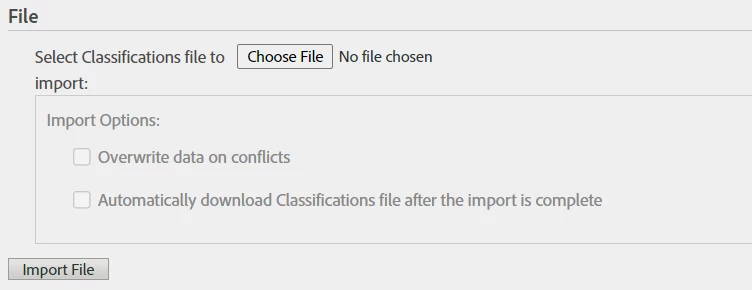
I do not see the Calssification import options highlighted/allowed to select while importing calssification. what could be the reason?


This post is no longer active and is closed to new replies. Need help? Start a new post to ask your question.
Best answer by Josh__Stephens

In your options, can you select the Report Suite and Data Set that you want to classify?  See attached.

If you don't have those options available, be sure that the classifications are set up correctly.


2 replies

Josh__Stephens
Josh__StephensAccepted solution
New Participant
December 28, 2023

In your options, can you select the Report Suite and Data Set that you want to classify?  See attached.

If you don't have those options available, be sure that the classifications are set up correctly.


Jennifer_Dungan
New Participant
December 26, 2023

I've never had enough rules to warrant using the importer (as opposed to just using the Rule Builder)... My options are also greyed out, but that might be because I don't have a previously imported classification set?


Is this a first time import? Or are you uploading a new version of rules to your classification?


If this is a first time import, and you have a QA or DEV suite, you could try uploading the classifications to your test suite, then try to upload again? Do the options appear when you try to upload a new file onto this classification where there is already a file?


I assume that these should be available for updating files...  if there is no file at this time, there is no "overwrite" logic to deal with yet, and there is no reason to download the Classification file after the import is complete because it will 100% match what you just uploaded... whereas for updating the Importer, you could be appending new rules, so the "Classification File" that Adobe exports will show all the rules... everything that was already there plus the newly appended rules.