Classification Importer - Browser Import | Community
Skip to main content
New Participant
January 3, 2024
Solved

Classification Importer - Browser Import

  • January 3, 2024
  • 1 reply
  • 1319 views

Hi, I've tried to upload a document of account IDs matching to our Sales Segmentation. However, I keep getting the error "There was a problem importing your file. Please try again later or use an FTP account to import your data." I would prefer to not use the FTP option (as I don't really know how) but can't figure out WHY I'm getting this error even after looking at all the documentation & troubleshoot help. I've ensured that there aren't any extra tabs/spaces in my file, but the formatting still looks wonky - could this be it? 
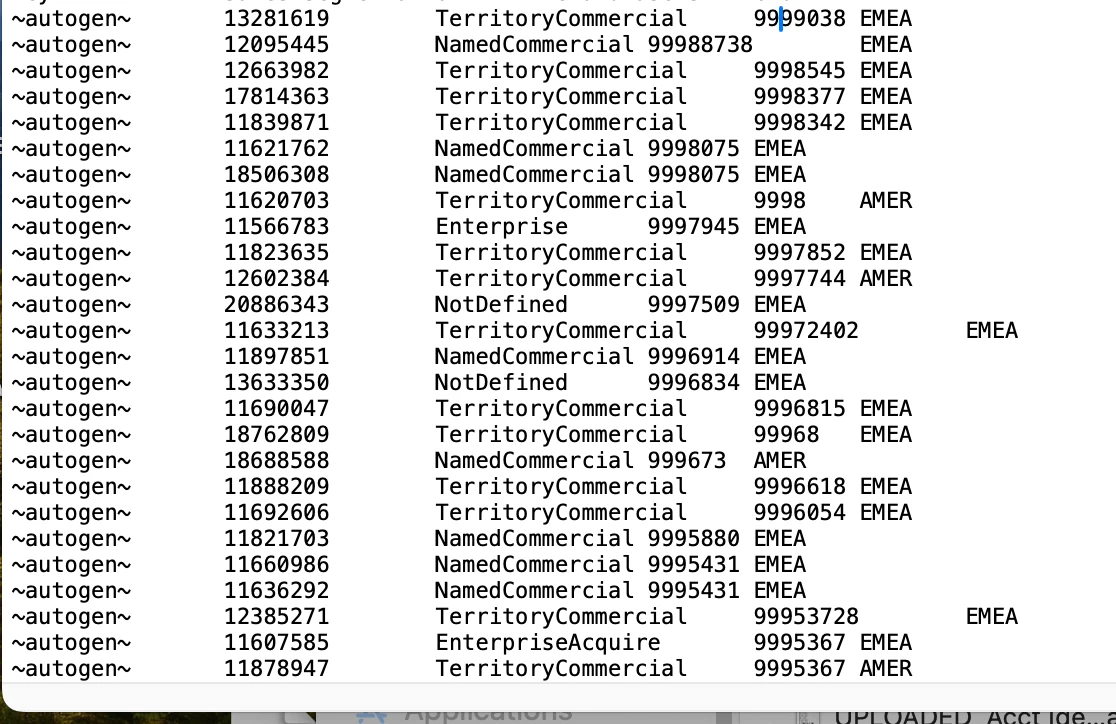
Grateful for any insight you can provide! 

This post is no longer active and is closed to new replies. Need help? Start a new post to ask your question.
Best answer by yuhuisg

"~autogen~" instructs AA to create new keys by itself. Search for "autogen" in https://experienceleague.adobe.com/docs/analytics/components/classifications/classifications-importer/c-saint-data-files.html?lang=en .

But I don't think that's what you want. You probably want to map your existing eVar values. So your first column should comprise of already-tracked values.

Also, please share a screenshot of your file's first 5 rows (preferably when the file is opened in a text editor) to let us help you to validate your file's headers.

1 reply

Pablo_Childe
New Participant
January 3, 2024

a few things to be carefule off. The master tab file format what application are you opening it up with? Be careful as excel can corrupt it and make it casue import errors I recommend a text editor like BBedit(or newer counterpart) 


Also is your 1st column the actual Key column? your example looks a bit odd to me but I dont know what your template is trylu like to concretely verify.

Jennifer_Dungan
New Participant
January 3, 2024

I agree the file looks a little odd.


When I export the template for my Campaign variable, I get the following pattern:


Key Creative Elements Classification 1 Classification 2 ....


Maybe you need to download the template again and populate with a plain text editor as @pablo_childe recommended... it seems like something is generating an extra column filled with "~autogen~"

yuhuisg
yuhuisgAccepted solution
New Participant
January 4, 2024

"~autogen~" instructs AA to create new keys by itself. Search for "autogen" in https://experienceleague.adobe.com/docs/analytics/components/classifications/classifications-importer/c-saint-data-files.html?lang=en .

But I don't think that's what you want. You probably want to map your existing eVar values. So your first column should comprise of already-tracked values.

Also, please share a screenshot of your file's first 5 rows (preferably when the file is opened in a text editor) to let us help you to validate your file's headers.