Classification Rule Builder | Community
Skip to main content
Level 2
Sep 2, 2024 9:03 AM UTC
Solved

Classification Rule Builder

We want to modify some regex found in Classification Rule Builder, but we get the following message
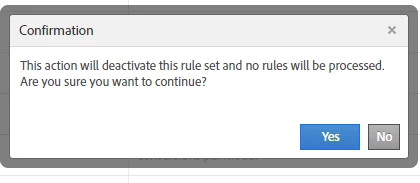
Could this mean that we do not have the necessary permissions to be able to make this modification?

Thank you

This post is no longer active and is closed to new replies. Need help? Start a new post to ask your question.
Isha__Gupta
Isha__GuptaAccepted solution
Level 1
Sep 2, 2024 9:32 AM UTC

Hi @exo_spain ,

No, this notification simply mean that the rules you are making changes to will be disabled and need to be enabled again. This is to prevent any data inconsistencies due to change in regex. Hit yes and make the changes to the rule set as you require. Once done, make sure to click on Activate again to bring the changes in effect.


More on this - https://experienceleague.adobe.com/en/docs/analytics/components/classifications/classifications-rulebuilder/classification-rule-builder

Best,
Isha

5 replies

Isha__Gupta
Isha__GuptaAccepted solution
Level 1
Sep 2, 2024 9:32 AM UTC

Hi @exo_spain ,

No, this notification simply mean that the rules you are making changes to will be disabled and need to be enabled again. This is to prevent any data inconsistencies due to change in regex. Hit yes and make the changes to the rule set as you require. Once done, make sure to click on Activate again to bring the changes in effect.


More on this - https://experienceleague.adobe.com/en/docs/analytics/components/classifications/classifications-rulebuilder/classification-rule-builder

Best,
Isha

Translate
ExO_SpainAuthor
Level 2
Sep 2, 2024 9:41 AM UTC

Hi @isha__gupta  

Thank you very much for your reply
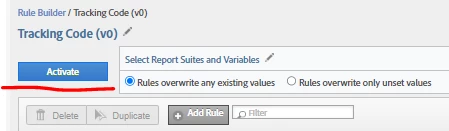
At the moment it is configured as shown in the attached image.
Should I hit yes, modify the rule and then activate it?
Regards


Translate
Isha__Gupta
Level 1
Sep 2, 2024 9:44 AM UTC

Yep. You can also click on Deactivate, edit the rule and Activate button will appear.

Translate