First you need to create classification for each of those names in the list, such as "CoverageAmount1", "MonthlyPremium1", and etc for the eVar. Then you can use Classification Rule Builder on that eVar that for each pair of name=value using Regular Expression
Match Criteria: name=([^|]+); where the "name" should be replaced by that as in eVar such as "CoverageAmount1"
Classification: name; this is the classification created on the eVar
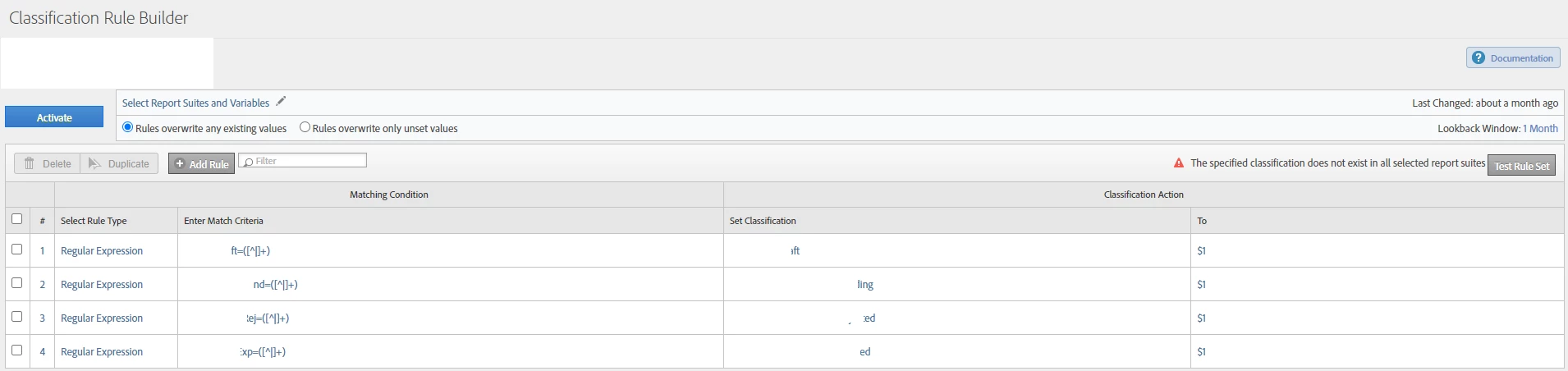
However, please note that eVar can hold up to 255 characters and your example is 261 long already. Any characters over 255 will be truncated.
I started to use List variables to store information like this which can save effort on classification, more dynamic option of name-value pair, and also more room to store data. You may wish to look at https://experienceleague.adobe.com/docs/analytics/admin/admin-tools/conversion-variables/list-var-admin.html?lang=en for details.
The only downside for List variables is that there are only 3 and you need to use them wisely and in a bit generic approach.