Creating a rolling quick segment | Community
Skip to main content
New Participant
April 18, 2023
Solved

Creating a rolling quick segment

  • April 18, 2023
  • 4 replies
  • 1772 views

I wonder if it is possible to create a quick segment with rolling date.
The background is that I want to create a quick segment for my colleagues so that they can easily choose the day they need and NOT changing the date-format at the right side of the panel (screenshot) (this is what I DON´T want!)

 

This post is no longer active and is closed to new replies. Need help? Start a new post to ask your question.
Best answer by Jennifer_Dungan

Does it have to be a "Quick Segment"?


Quick Segments only use Dimensions, it's accessed through this button:


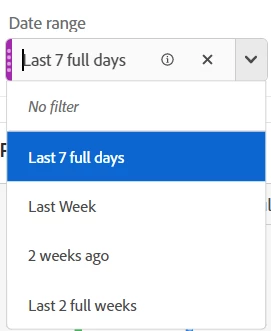
But if you are curating the report, why can't you make a traditional "drag and hold shift" and populate a drop down segment with rolling Date Ranges (Last 7 Full Days, Last Week, 2 Weeks Ago, Last 2 Full Weeks, etc - whatever dates/date ranges you need)


You can remove the "No filter" option so that users are locked only the the items provided.

4 replies

Josh__Stephens
New Participant
April 20, 2023

Is there a way to do this using the new Relative Date Ranges option?

Check the box below for the panel, date ranges will be relative to the start date of the panel.  Perhaps date ranges such as 7-days ago, 6-days ago, 5-days ago, etc., relative to the start date of the panel, would be helpful?


New Participant
April 19, 2023

Ok, what I wanted is still not working.
I want my colleagues to have the opportunity to choose the date they need. And for this I want to have something like on the picture. But becaue it would be to cumbersome to add every day a new day in the segment I want it to "roll" and add automatically the new day.

Of course it is possible to use e.g. "Last 2 weeks" but this is not what I want. Maybe it´s not possible the way I wanna do it, so please let me know 🙂

kayawalton
New Participant
April 19, 2023

Hi @hanna_heider -- you can create custom data ranges with rolling dates and then drop them into the segment dropdowns.

https://experienceleague.adobe.com/docs/analytics/analyze/analysis-workspace/components/calendar-date-ranges/custom-date-ranges.html?lang=en 

If you need help with setting up specific rolling dates, let us know!

New Participant
April 20, 2023

Unfortunately, this is not the way I want it. I guess what I want is not possible 😕😕

Krishna_Musku
New Participant
April 18, 2023

You can add date ranges component into the quick segment, which will have lot of preset date ranges.

Jennifer_Dungan
Jennifer_DunganAccepted solution
New Participant
April 18, 2023

Does it have to be a "Quick Segment"?


Quick Segments only use Dimensions, it's accessed through this button:


But if you are curating the report, why can't you make a traditional "drag and hold shift" and populate a drop down segment with rolling Date Ranges (Last 7 Full Days, Last Week, 2 Weeks Ago, Last 2 Full Weeks, etc - whatever dates/date ranges you need)


You can remove the "No filter" option so that users are locked only the the items provided.

Jennifer_Dungan
New Participant
April 18, 2023

FYI... the term "Quick Segment" refers to being able to build segments using this simplified interface:


versus using the Full Segment Builder:


If you are calling drop down segments "quick segments" this will cause confusion with most people..... I only realized after my answer that you might be using the term to represent drop downs....


New Participant
April 19, 2023

Sorry for the confusion, at that moment I thought this would be the name of it, but you are right!