creating segments for revisitors during two different date ranges | Community
Skip to main content
New Participant
January 12, 2024
Solved

creating segments for revisitors during two different date ranges

  • January 12, 2024
  • 2 replies
  • 2899 views

Hi!

We run a campaign a couple of times a year, and I'm curious about the repeat customers who keep coming back and engaging (visiting and ordering). The problem is, when I try to build segments for these loyal visitors, it keeps grabbing folks who only participated in the second campaign. I've tried excluding them, but no dice.


Creating the desired segment:

Let's say I want a segment of people who visited a specific page between January and June, ordered something then, and returned for another purchase between July and December. I used the "after sequence" feature to track July-December orders, but as you guessed, it included folks who first bought in the second half. Ideally, I only want customers with a purchase history in the first half.

I tried excluding those cases by adding visit number or customer loyalty dimensions to the bottom visit container and excluding them. Unfortunately, that ended up wiping out most of the results (probably because the exclusion was in the visitor bucket. visit or hit buckets did not changed the results).
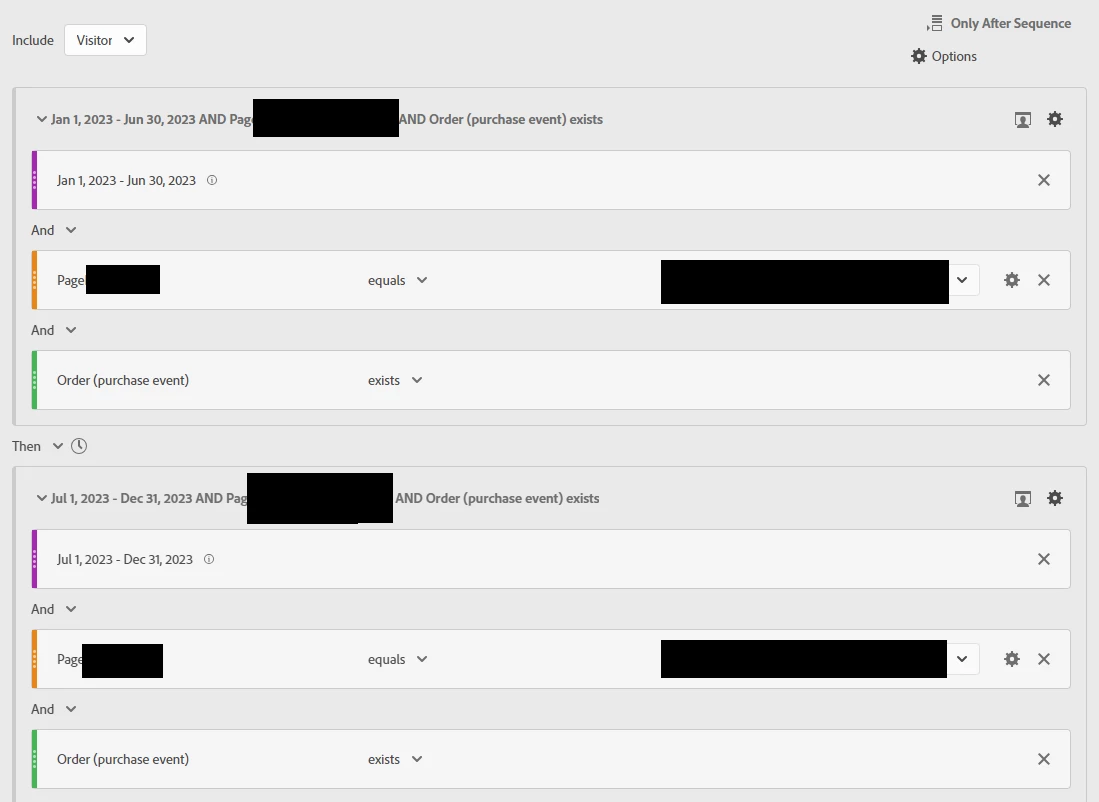
 

how can we do this?

This post is no longer active and is closed to new replies. Need help? Start a new post to ask your question.
Best answer by kr8tive

Right, I just simplified my examples... I could have also added a specific page to it.. but if this doesn't work... then adding a page is likely to fail as well.


In my recent meeting with Adobe, we discussed inconsistencies in traffic data. Orders and visits from seemingly new visitors were categorized as low traffic due to discrepancies between backend and UI-displayed visitor IDs. Essentially, different backend IDs might be getting grouped under the same ID in Workspace. It is better to use a data warehouse when we look into visitor IDs

2 replies

Jennifer_Dungan
New Participant
January 12, 2024

Hmm while that should work, I was having some issues replicating as well... but instead of using a date range, I added a sub container inside the first clause for: 


Month equals Jan 2023

OR

Month equals Feb 2023

OR

Month equals Mar 2023

OR

Month equals Apr 2023

OR

Month equals Jun 2023


And then in the second part, another container for the Months Jul - Dec


Try this and see if it works better?

kr8tiveAuthor
New Participant
January 12, 2024

To clarify, the 'test seg' I mentioned earlier is the one with the specific structure we discussed. The 'V2 seg' is the one that uses a sub-container with the 'or' condition.

The example I'm showing you now falls under the category of visitors who only made purchases in the second half of the period

Jennifer_Dungan
New Participant
January 12, 2024

Keep in mind that the "ONLY After Sequence will not show the purchases in the first half.. only the second.


When I tested, I had ALL purchases (unfiltered), next to the segment filtered content.


I could see before and after purchases in the all orders column and only the second half purchases in the segment column...


In the date range one, I had people who didn't trigger the event in the first half... but that should have worked.. I think they may be making tweaks to the date logic again... 


Vinay_Chauhan
New Participant
January 12, 2024

Did you try involving Experience Cloud ID or MID in the calculation?

kr8tiveAuthor
New Participant
January 12, 2024

For the initial assessment of my segment's performance, I opted for the visitor ID dimension as I'm still familiarizing myself with Experience Cloud ID and MID