Data Extract Option in Reports | Community
Skip to main content
New Participant
August 23, 2018
Solved

Data Extract Option in Reports

  • August 23, 2018
  • 1 reply
  • 819 views

Hi, I can only download 400 rows of data at a time when I create a report in Workspace. It seems there is an option called data extract that allows you to download any number of rows of data. I don't see this option using my current access level. Can someone help me on what user access do I need to have to be able to use this feature?
This post is no longer active and is closed to new replies. Need help? Start a new post to ask your question.
Best answer by PratheepArunRaj

Dear Netelix,

In Analysis Workspace you can only extract 400 rows of data at a time.

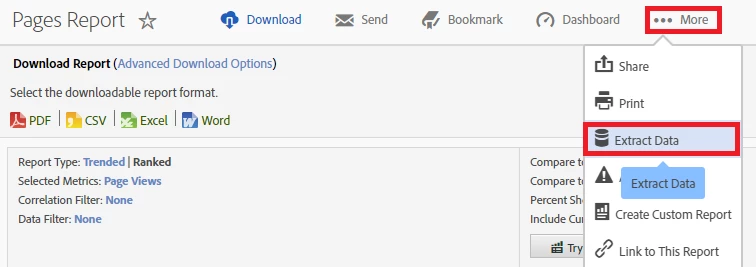
We do have Data Extract option, not in Workspace but in Analytics Interface : Below the screen grab from Pages Report:

Thank You!

Arun

1 reply

PratheepArunRaj
PratheepArunRajAccepted solution
New Participant
August 23, 2018

Dear Netelix,

In Analysis Workspace you can only extract 400 rows of data at a time.

We do have Data Extract option, not in Workspace but in Analytics Interface : Below the screen grab from Pages Report:

Thank You!

Arun