
Data Feed raw data column auto convert in Excel | Community
Skip to main content
DineshRkumar
New Participant
May 17, 2024
Solved

Data Feed raw data column auto convert in Excel

  • May 17, 2024
  • 2 replies
  • 1025 views

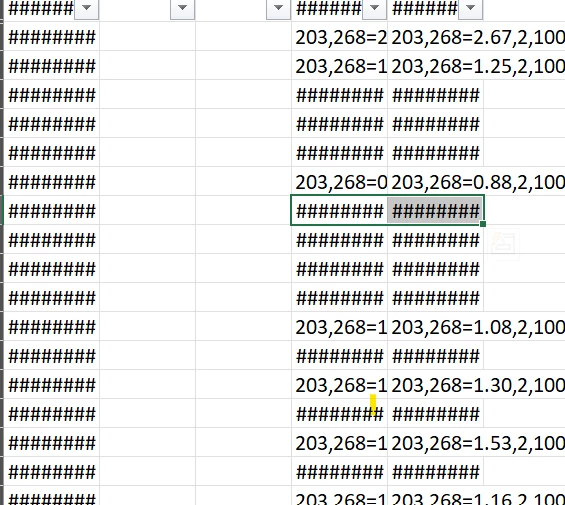
Hi Team,,, Yesterday I received raw data from Data feed in zip format. After extracting it, when I opened the file seeing "event_list" column is getting converted into "##########". not able to understand the content behind it. Please suggest here how to extract data from "############"


This post is no longer active and is closed to new replies. Need help? Start a new post to ask your question.
Best answer by Jennifer_Dungan

I believe this is just an Excel visual display, not an actual conversion of the content....


See https://superuser.com/questions/65556/excel-displays-for-long-text-whats-wrong


Can you open your raw data feed into a text editor? Notepad, Notepad++, TextEdit, etc


You should see the data as it actually is... 

2 replies

Ankit_Chaudhary
New Participant
May 18, 2024

During initial load excel ask to convert field type simply select don't convert any you might prevent this.

Jennifer_Dungan
Jennifer_DunganAccepted solution
New Participant
May 17, 2024

I believe this is just an Excel visual display, not an actual conversion of the content....


See https://superuser.com/questions/65556/excel-displays-for-long-text-whats-wrong


Can you open your raw data feed into a text editor? Notepad, Notepad++, TextEdit, etc


You should see the data as it actually is... 

DineshRkumar
New Participant
May 22, 2024

However, we can't play much in other editor than Excel.. any better way.. please suggest..

Jennifer_Dungan
New Participant
May 23, 2024

Oh I get that, Excel is the tool for manipulating data, but you may have to try changing the data formatting to Text or General (to get it back), or as @ankit_chaudhary suggested, try and prevent Excel from converting the formatting to start with.