Data Feed to SFTP data file exception. | Community
Skip to main content
Level 2
Nov 18, 2024 7:57 AM UTC
Question

Data Feed to SFTP data file exception.

Hello,

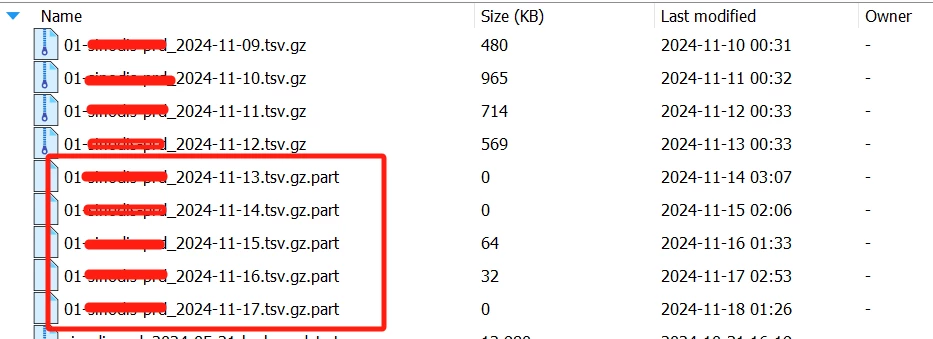
Data Feed to SFTP  data file exception. The .part file cannot be extracted or opened. Previously, there were no files with the .part suffix. What could be the reason for this?


This post is no longer active and is closed to new replies. Need help? Start a new post to ask your question.

4 replies

FarazHusain
Employee
Nov 18, 2024 9:13 AM UTC

Hey @leozh1 To fix this, you need to go to -> Locations -> Location Account and disable - Use temporary file extension during upload

This setting is by default enabled for SFTP, but you can toggle off this setting and you won't see these temporary files.


Translate
leozh1Author
Level 2
Nov 18, 2024 10:12 AM UTC

Hello, I mean that it's not a temporary file issue. From the images, you can see that the files were complete and normal a few days ago, but now they are all .part files. I checked on AA, and it reported an error, but I don't know what the reason is.


Translate
FarazHusain
Employee
Nov 18, 2024 10:53 AM UTC

Do you have any sort of automation that is picking up the files from SFTP? What I have seen in past, sometimes, this automation picks up part files instead of complete files (actually, when the file is large, the files are broken into .part files and are put into the SFTP server, and then these are combined into 1 file). I would suggest to log a support ticket with the SFTP details to review the same.

Translate