Delete Ad-hoc Analysis Projects | Community
Skip to main content
alim93424919
New Participant
June 6, 2017
Solved

Delete Ad-hoc Analysis Projects

  • June 6, 2017
  • 2 replies
  • 1397 views

How can I delete Ad-hoc Analysis projects?

I know how to delete Workspace projects but I don't see how I can delete Ad-hoc Analysis projects.

Ali

This post is no longer active and is closed to new replies. Need help? Start a new post to ask your question.
Best answer by Kaushalendra

Hi alim93424919​,

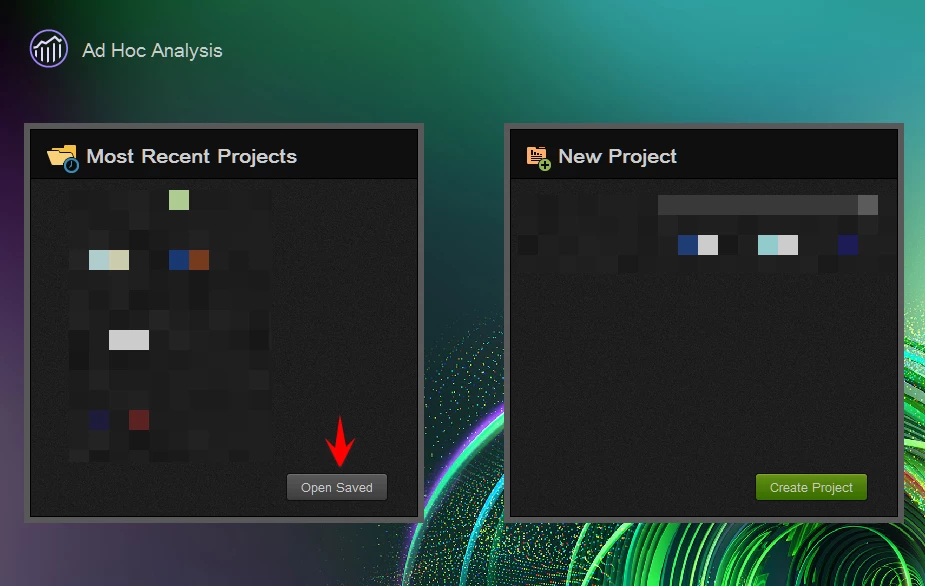
You can follow below mentioned steps to delete projects in Ad Hoc Analysis:
  1. Login to Ad Hoc
  2. Click on "Open Saved" button under the "Most Recent Projects" section:
  3. It will open a pop-up showing all your projects. Select the ones you want to delete and then click on Delete.

Note that you can only delete the projects saved by you.

2 replies

alim93424919
New Participant
June 7, 2017

Thanks for the quick reply!

Kaushalendra
KaushalendraAccepted solution
Employee
June 6, 2017

Hi alim93424919​,

You can follow below mentioned steps to delete projects in Ad Hoc Analysis:

  1. Login to Ad Hoc
  2. Click on "Open Saved" button under the "Most Recent Projects" section:
  3. It will open a pop-up showing all your projects. Select the ones you want to delete and then click on Delete.

Note that you can only delete the projects saved by you.