Edit right for shared project | Community
Skip to main content
Level 2
Jul 9, 2019 7:15 AM UTC
Solved

Edit right for shared project

Hello,

If I share a project to my colleagues, only the admin can edit and save it.

All other users can only "save as".

Can you please let me know what is the permission to give them the right to do this?

Thank you,

Vadim

This post is no longer active and is closed to new replies. Need help? Start a new post to ask your question.
kumararajak
kumararajakAccepted solution
Level 5
Jul 12, 2019 8:09 AM UTC

Dear KR,

Yes, if you are an Admin you need to grant the access to the users as per the below screenshot
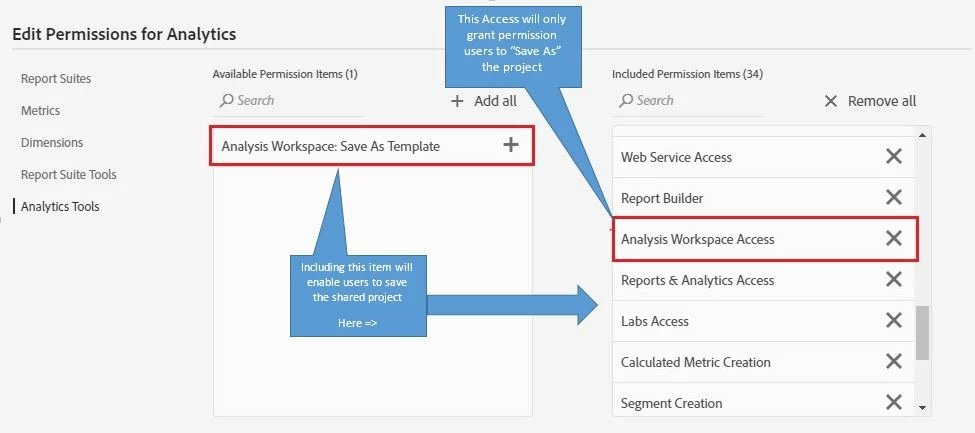
In Adobe Analytics Workspace, you cannot give them read/write only access.

If the user has the Permission that includes 'Analysis Workspace Access' and 'Analysis Workspace:Save As Template', they can Save and edit your Workspace project.

If the user has the Permission that only includes 'Analysis Workspace Access' and not 'Analysis Workspace:Save As Template', they can only 'Save As' or 'Copy' the Project in their Dashboard to edit.

Hope this Helps

Regards,

Kumararaja K

7 replies

Employee
Jun 23, 2020 6:08 PM UTC

Co-editing among non-admins is now available through project sharing roles - https://docs.adobe.com/content/help/en/analytics/analyze/analysis-workspace/curate-share/share-projects.html

Admins can also co-edit, just as before.

Translate
kumararajak
kumararajakAccepted solution
Level 5
Jul 12, 2019 8:09 AM UTC

Dear KR,

Yes, if you are an Admin you need to grant the access to the users as per the below screenshot

In Adobe Analytics Workspace, you cannot give them read/write only access.

If the user has the Permission that includes 'Analysis Workspace Access' and 'Analysis Workspace:Save As Template', they can Save and edit your Workspace project.

If the user has the Permission that only includes 'Analysis Workspace Access' and not 'Analysis Workspace:Save As Template', they can only 'Save As' or 'Copy' the Project in their Dashboard to edit.

Hope this Helps

Regards,

Kumararaja K

Translate
Employee
Jul 12, 2019 5:03 AM UTC

If you Add user account in Admin tab of the product profile that user account will automatically get the permission to edit the workspace project shared with them. However, normal user only get option to "save as" option for the project shared by admin user account.

Translate
B-newAuthor
Level 2
Jul 11, 2019 12:55 PM UTC

I'm sorry but you are not replying to my question.

I do not want to "save as" and every time create a other version of the shared project.

I want that all my team works together on the same shared project. I want to be able to affect the original project.

What access should I give them for this?

Thank you for your help,

Vadim

Translate
Balaji_V
Level 4
Jul 11, 2019 7:21 AM UTC

Dear KR,

In default, workspace provides an editing option when the project shared to anyone, so no need to grant any additional access.

however, the changes made by the other users will not affect the original project.

Thanks,

Balaji

Translate
B-newAuthor
Level 2
Jul 11, 2019 6:36 AM UTC

Hi Balaji_V,

With my account (admin), I can edit any other shared project. Should I then give admin rights to every one?

KR

Translate
Balaji_V
Level 4
Jul 9, 2019 9:59 AM UTC

Hi,

A shared project can save their changes as a new project (save as...). They are not able to save changes in the original project. Until you share your login credential.

You can even share the project link, can be open if your colleagues have a login.

Please check on this link https://docs.adobe.com/content/help/en/analytics/analyze/analysis-workspace/curate-share/curate.html

Thanks,

Balaji

Translate