Error creating visualization | Community
Skip to main content
New Participant
October 20, 2023
Solved

Error creating visualization

  • October 20, 2023
  • 1 reply
  • 1764 views

Hello,


I created a summary change visualization and I want to lock that visualization ..when i try to  do so im getting a certain error which says "Unable to render visualization: Please check your columns and rows to ensure they contain valid components".


What should I do to lock the visualization.
 

This post is no longer active and is closed to new replies. Need help? Start a new post to ask your question.
Best answer by Jennifer_Dungan

When creating a Summary Change Visualization, you need to select your 2 cells of data for comparison, make sure you choose them in the right order for the change.


Don't click off of those cells yet...


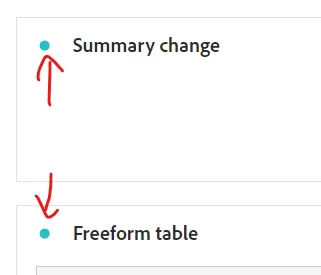
I;m sure you have noticed the colour-coded dots on visualizations that match the colour on the Freeform table?


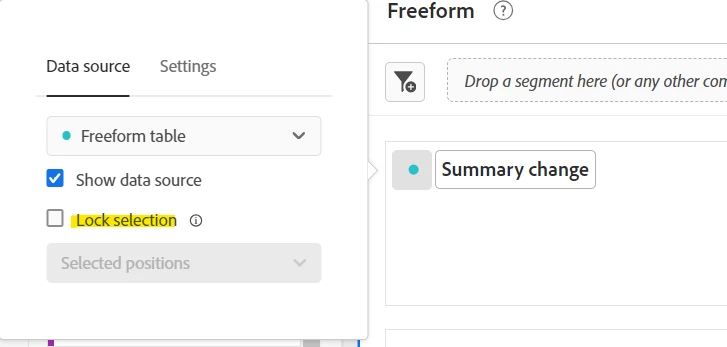
Click on the dot of the Summary Change Visualization:


Now choose "Lock selection"


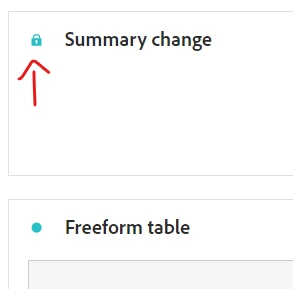
The colour-coding will remain, but the dot will turn into a lock symbol:


Now you can de-select the cells in your freeform table.


1 reply

Jennifer_Dungan
Jennifer_DunganAccepted solution
New Participant
October 20, 2023

When creating a Summary Change Visualization, you need to select your 2 cells of data for comparison, make sure you choose them in the right order for the change.


Don't click off of those cells yet...


I;m sure you have noticed the colour-coded dots on visualizations that match the colour on the Freeform table?


Click on the dot of the Summary Change Visualization:


Now choose "Lock selection"


The colour-coding will remain, but the dot will turn into a lock symbol:


Now you can de-select the cells in your freeform table.


AshwinC5IAuthor
New Participant
October 20, 2023

Thank you, it worked

Jennifer_Dungan
New Participant
October 20, 2023

You're welcome 🙂


You can lock other visualizations the same way... if the lock isn't available that usually means that the full table is being visualized... not sure why we can't lock that situation...