eVars not showing as option in Reports | Community
Skip to main content
bobc76334831
New Participant
February 16, 2022
Solved

eVars not showing as option in Reports

  • February 16, 2022
  • 3 replies
  • 1858 views

I have defined a series of custom eVars and can see them in the debugger, however they are not available as an option in Reports. What am I missing?

This post is no longer active and is closed to new replies. Need help? Start a new post to ask your question.
Best answer by RaawiMahendru

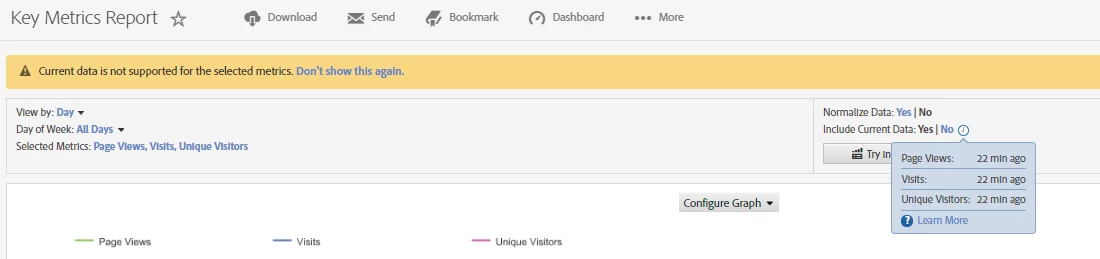
Hey @bobc76334831 - Can you double check if the evars are enabled in the report suite ? Sometimes it is enabled in the dev report suites and disabled in prod, may be this is a basic check, but didn't want to assume. Also, lyou can go to Key Metrics report and check the actual latency for the report suite in question, as seen below.
 

3 replies

RaawiMahendruAccepted solution
New Participant
February 16, 2022

Hey @bobc76334831 - Can you double check if the evars are enabled in the report suite ? Sometimes it is enabled in the dev report suites and disabled in prod, may be this is a basic check, but didn't want to assume. Also, lyou can go to Key Metrics report and check the actual latency for the report suite in question, as seen below.


Employee
February 16, 2022

Hi @bobc76334831! Generally, a variable (prop or evar) need up to 90 minutes for appear in report. However, if you want the value immediately, please confirm on Report & Analytics with "Include Current Data". 

Please confirm below URL about Current Data as well.


- Current Data

https://experienceleague.adobe.com/docs/analytics/analyze/reports-analytics/current-data.html?lang=en


Thanks!

nilotpal
Employee
February 16, 2022

Hi @bobc76334831,

The custom eVar values that you see in the debugger is not immediately available in Analytics Workspace and Reports.

It can take upto 2 hours to reflect in the reporting depending on the latency on your report suite.


Other things that you should consider checking:

  • if correct tracking server is configured
  • if the data is being sent to the correct report suite
  • if the eVar is enabled for that report suite

Hope this helps!