Event IDs missing for post_event_list column | Community
Skip to main content
New Participant
May 10, 2022 6:39 AM UTC
Solved

Event IDs missing for post_event_list column

I am trying to map event ids from the post_event_list column. In the events.tsv file, I can see that event ID 1,2,5,10,11,12 and so on IDs are present.

But the mapping which frontend team used while integrating Omniture to the UI; they are storing the most important and required data in event IDs 3,4,7 which are not even present in the events.tsv file.

Am I missing something or the mapping that they provided is incorrect? Do event IDs 3,4,7 even exist in the events.tsv file?
This post is no longer active and is closed to new replies. Need help? Start a new post to ask your question.
nBadola12Accepted solution
Employee
May 10, 2022 10:09 AM UTC

Hi @shivamchand8592 ,
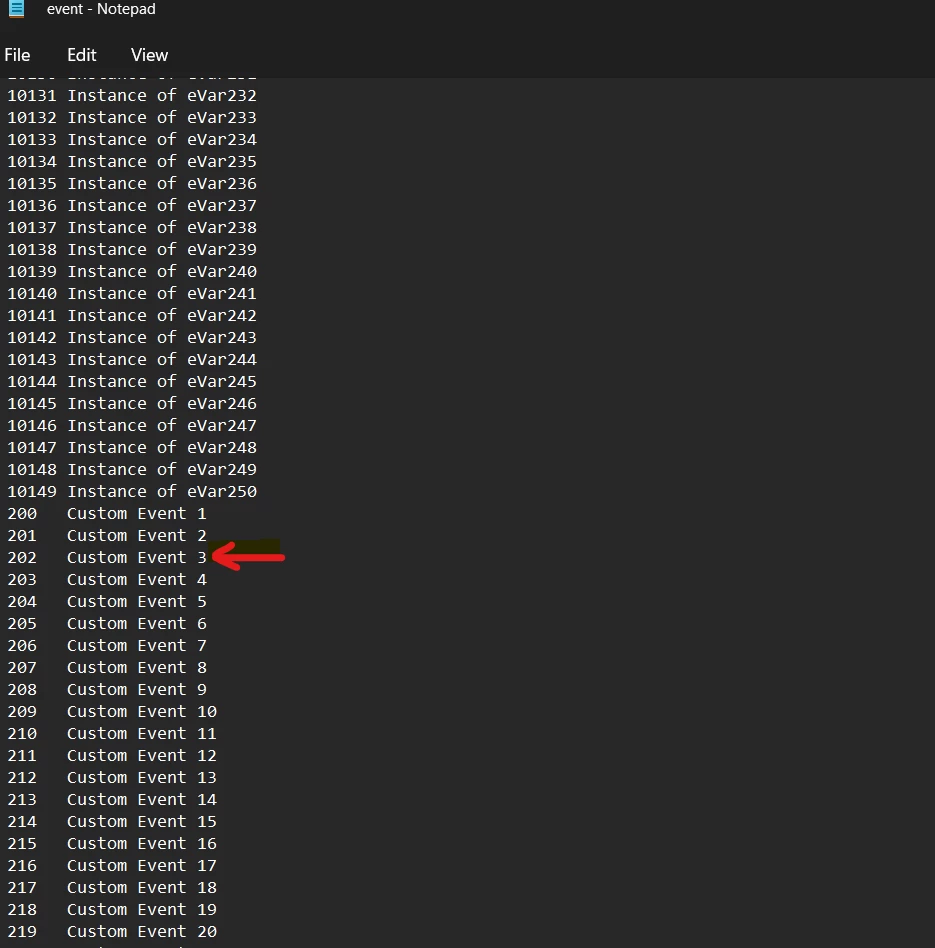
In the event.tsv file, you have to look for Custom Event X, X being your event number. For example, event 3 in reports will be - "Custom Event 3" in event.tsv lookup file and it will show up as "202" in "post_event_list" column.


3 replies

New Participant
Jul 21, 2023 12:44 PM UTC

Hi Shivam,
Can you please let me know from where you got the event.tsv file.
Thanks 

Translate
nBadola12Accepted solution
Employee
May 10, 2022 10:09 AM UTC

Hi @shivamchand8592 ,
In the event.tsv file, you have to look for Custom Event X, X being your event number. For example, event 3 in reports will be - "Custom Event 3" in event.tsv lookup file and it will show up as "202" in "post_event_list" column.


Translate
Level 2
Oct 13, 2022 3:55 PM UTC

Where in the heck do you find the excel.tsv lookup file?

Thank you!

Translate