Exit vs Segment Filter - Metric: Exits, adds pages outside of set Segment | Community
Skip to main content
New Participant
March 13, 2019
Solved

Exit vs Segment Filter - Metric: Exits, adds pages outside of set Segment

  • March 13, 2019
  • 3 replies
  • 1262 views

Hi guys and girls,

something simple?!

I have a Page Dimension, with my specific segment filter set for a group of pages.

in a Single Page overview:

Page Views, Visits, Unique Visitors, works fine

however, once I add Exits or Bounce Rate, I have a return of many more webpages,

and these do not fit the Segment setting. why?

Am I overlooking or missing something?

And...

What to do to keep using the segment setup, as using the filter is ok for once, but I manage about 150 page groups.

Setting the segments is already work enough

Thanks
This post is no longer active and is closed to new replies. Need help? Start a new post to ask your question.
Best answer by Urs_Boller

Ok, i try to explain it by a simple example based (fake data from my short journey just to show what happens)

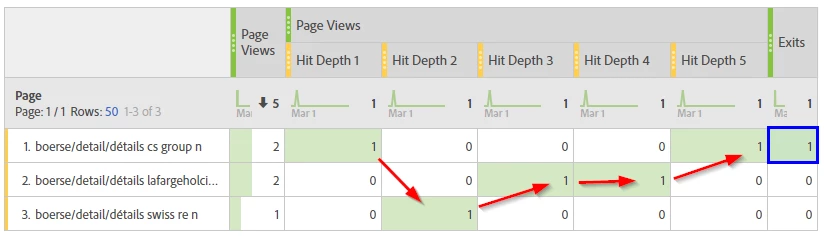
Assume a user who has seen 3 pages, 2 of them twice. you can see what pages the user has seen by the "hit depth column", means you can follow the path through the pages (red line).

now lets look at the "Exits" metric. According to the description Exits the metric "number of times a given value is captured as the last value in a visit". in this visit the last value captured for page is "....cs group n" (first item), thus you get a value of "1" for the "Exits" in the first row (blue box)

now lets add a hit container and see what happens. I apply a hit segment to only show hits for page 2. I would assume that I wil only get pages views for hit 3/4 while all other hits disappear. but what happens to the exits?

Ok, that is interesting. you can see the following in the new table

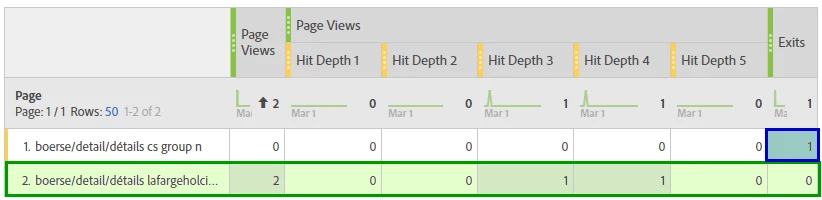
  1. as expected, the page views are now filtered to the page where I set the hit segment. that means I only get "Page Views" for the corresponding pages (green box, second row)
  2. the "Exits" is still at the same place (blue box) and pointing to the same page as in the first table! that means, even if I do not have the first page in my segment (no "Page Views", see first column) the row appears and indicates a "1" for the "Exits". This is because it is still the same visit and this visit has seen the page in the first row as last dimension item. Therefore the page appears and gets a counter for "Exits". in the description (link above) you can read: "When applied to a dimension, Exits are counted on the last value of a visit, which may happen on any hit during the visit."

I hope that this example helps to understand why you see values outside of your hit segment.

3 replies

Urs_Boller
Urs_BollerAccepted solution
New Participant
March 14, 2019

Ok, i try to explain it by a simple example based (fake data from my short journey just to show what happens)

Assume a user who has seen 3 pages, 2 of them twice. you can see what pages the user has seen by the "hit depth column", means you can follow the path through the pages (red line).

now lets look at the "Exits" metric. According to the description Exits the metric "number of times a given value is captured as the last value in a visit". in this visit the last value captured for page is "....cs group n" (first item), thus you get a value of "1" for the "Exits" in the first row (blue box)

now lets add a hit container and see what happens. I apply a hit segment to only show hits for page 2. I would assume that I wil only get pages views for hit 3/4 while all other hits disappear. but what happens to the exits?

Ok, that is interesting. you can see the following in the new table

  1. as expected, the page views are now filtered to the page where I set the hit segment. that means I only get "Page Views" for the corresponding pages (green box, second row)
  2. the "Exits" is still at the same place (blue box) and pointing to the same page as in the first table! that means, even if I do not have the first page in my segment (no "Page Views", see first column) the row appears and indicates a "1" for the "Exits". This is because it is still the same visit and this visit has seen the page in the first row as last dimension item. Therefore the page appears and gets a counter for "Exits". in the description (link above) you can read: "When applied to a dimension, Exits are counted on the last value of a visit, which may happen on any hit during the visit."

I hope that this example helps to understand why you see values outside of your hit segment.

yessAuthor
New Participant
March 14, 2019

Hi,

sorry, not seeing the link between the 2 problems (yet)

please further explain.

in addition, see below.

my segment '2363 Test' filters on 'hit' - and must include words 'r2459' and '2363' - and gives 14 pages (is correct), scrn 1

when I pull in 'exits' as metric, 71 additional pages without words r2459 and 2363 are pulled into my overview, scrn 2

thanks

Urs_Boller
New Participant
March 13, 2019

not, not simple at all. you just don't get the "entries" you would expect. In short, it is not a counter for "entry page in your segment". I wrote a full description how I think it works here: Visits and entries nearly match when analysing a segment

If this doesn't help, just drop a screenshot of your table and I'll try to explain.