Fix Granularity Representation on Export | Community
Skip to main content
Level 4
Jul 20, 2018 6:14 PM UTC
Investigating

Fix Granularity Representation on Export
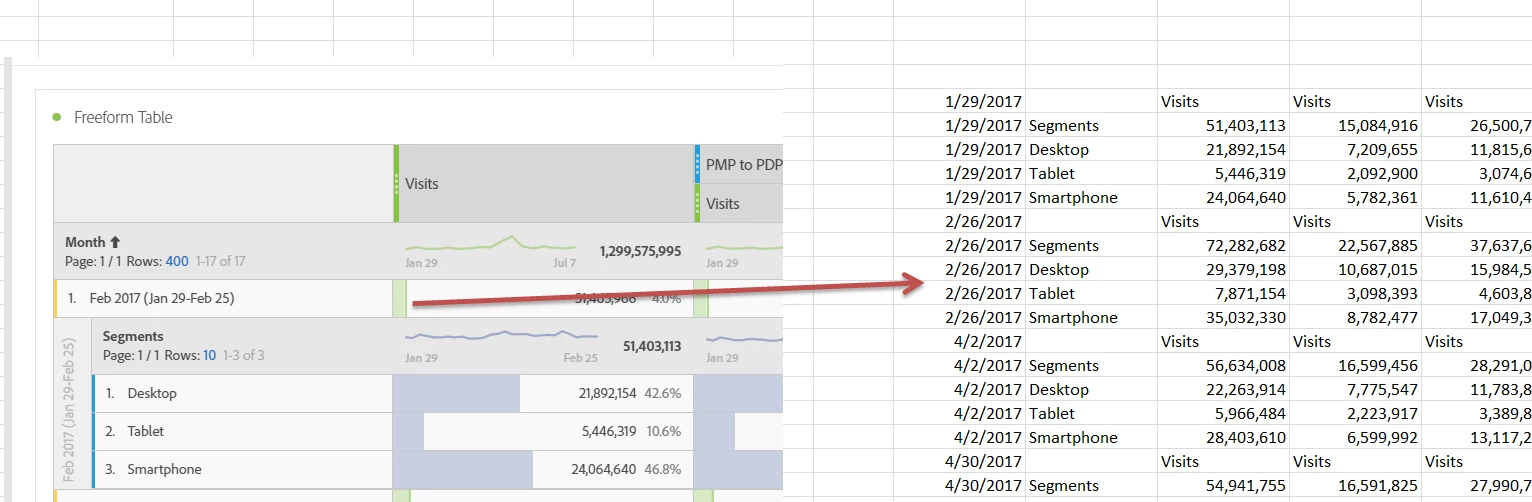
Could you guys get this on the roadmap?  It's hard to share a project with someone in workspaces if they have to figure out what month 10/29/18 is on a fiscal calendar

9 replies

J2_2Author
Level 4
Jul 31, 2019 8:05 PM UTC

Sounds Good, thanks Jen!

Translate
Employee
Jul 31, 2019 7:55 PM UTC

Marking this as "For Future Consideration".

Earlier this year, we made updates to our CSV exports to remove all formatting, so that CSVs remained focused on raw data only. That way, end users can apply any formatting that they need. This request falls into the "formatting" category, instead of a "data" category.

Translate
J2_2Author
Level 4
Aug 23, 2018 7:06 PM UTC

Thanks for the feedback Jen - the sorting is a pretty easy fix in excel.

It's more challenging if a new user  pulls a monthly report, and gets an output like "05/06/18", and have to explain to someone that that signifies the month of May, that it isn't something that was pulled by day with a bunch of missing days etc.

Where a user can see "May (May 6 - June 2)" and know what they're looking at.

Translate
Employee
Aug 23, 2018 6:59 PM UTC

If we made this change, it would change the field in the CSV to text format, which means it would no longer be sortable. Does that pose a problem for how you use those exports? Or would you still prefer text strings in there?


The other option is to add an additional column with the text string. We think that might not be ideal though because it would through off any references to the table.

Let me know what you think!

Translate
J2_2Author
Level 4
Aug 21, 2018 1:42 PM UTC

Yep - that would be much better,and makes more sense

On Mon, Aug 20, 2018 at 4:58 PM, jen.lasser <forums_noreply@adobe.com>

Translate
Employee
Aug 20, 2018 9:57 PM UTC

We are looking into this one. We would like to show the month in the CSV as a text string, just like it is displayed in Workspace. It would show "Feb 2017 (Jan 29-Feb 25)" in this case.

Would that work for both of your use cases? jharrington7897ericb69243940jharrington7897

Translate
ebr64
Level 2
Aug 17, 2018 6:42 AM UTC

Il not sure I get the desired behaviour in detail but I may have similar issue.

Basically our fiscal months are cut off 3 business days prior to end of calendar month.

so fiscal August 18 for example starts 27th of July.

I guess the desired behaviour here would be to be able to define a specific « fiscal month » dimension where « August FY18 » would be July 27t-August 28th. Am I right ?

If yes, I’d be interested into this as well, but not for replacement of the standard calendar month dimension, more as a second option because not all our business users want to use the fiscal view.

Eric

Translate
J2_2Author
Level 4
Aug 13, 2018 7:15 PM UTC

Sure thing -

In the example above, Feburary of 2017 are the dates 1/29/17 - 2/25/17 for a fiscal calendar.

If you create a report (like on the left) of say sales broken down by month,  and then you export that report to a CSV, the output, rather than being labeled as "Feb 2017" is actually the starting date of February.

This makes it challenging to work with this data, as you can have a date which "appears" to be February (2/26/17) but is actually March.

The desired output would be the label "Feb 2017" (same as the report) rather than 1/29/17

Translate
Employee
Aug 13, 2018 7:05 PM UTC

Can you elaborate more around what your example is showing, and what the desired behavior is? Thanks!

Translate