How do I compare desktop users vs mobile users results? | Community
Skip to main content
Level 2
Jul 23, 2021 4:02 PM UTC
Solved

How do I compare desktop users vs mobile users results?

How do I compare desktop users vs mobile users results?

This post is no longer active and is closed to new replies. Need help? Start a new post to ask your question.
VaniBhemarasetty
VaniBhemarasettyAccepted solution
Employee
Jul 25, 2021 2:24 PM UTC

@sirishagorle 

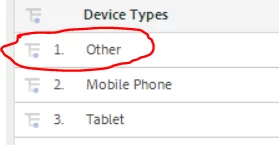
You can get a desktop vs mobile report by selecting "Device Type" dimension

"Other"  can be used for identifying "desktop" visits. 

You can further break this dimension by operating system and browser dimension to get a holistic view of desktop traffic

4 replies

Level 3
Mar 16, 2023 9:05 PM UTC

In Mobile device report, mobile phone refers to mobile users and other refers to desktop users.

Translate
Pablo_Childe
New Participant
Aug 22, 2021 4:58 PM UTC

There is a really cool way to do this but it can get a bit messy with many dimensions selected:

You will need 2 segments(one for view group A and one for B)if you want can use default view vs a segment as well.


First pull a regualr report you want. then at top look for "Compare to segment". Just pick segment # 2 and voila you will get 2 columns comapring to each other. You may need to adjust which segement you view vs which you compare to get the % changes to reflect as you like.


good luck.

Translate
VaniBhemarasetty
VaniBhemarasettyAccepted solution
Employee
Jul 25, 2021 2:24 PM UTC

@sirishagorle 

You can get a desktop vs mobile report by selecting "Device Type" dimension

"Other"  can be used for identifying "desktop" visits. 

You can further break this dimension by operating system and browser dimension to get a holistic view of desktop traffic

Translate
atulsingh17
Level 2
Jul 23, 2021 6:34 PM UTC

Hi @sirishagorle ,

You can use Mobile Device Type report, where in "Mobile Phone" means users coming from mobile device & "Other" means users are coming from desktop.

Translate