How to arrange order of Dimensions manually? | Community
Skip to main content
New Participant
Aug 1, 2018 11:18 PM UTC
Solved

How to arrange order of Dimensions manually?
Hi,

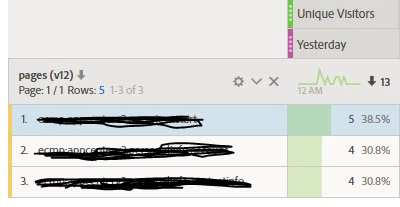
I know we can arrange the order of dimension based on increasing/decreasing order of any metric. But how to arrange it manually, when due to certain pathing pages in lower funnel can have more visitors than pages in top of the panel. For example, in above sample screenshot, what if I want the bottom page with 4 visits to be at the top without using the auto-squence which changes all 3? ( or when we have many pages at once, but few pages order need to be arnaged).

Any help and comments appreciated!

Regards

Pankaj

This post is no longer active and is closed to new replies. Need help? Start a new post to ask your question.
PratheepArunRaj
PratheepArunRajAccepted solution
New Participant
Aug 2, 2018 8:20 AM UTC

Dear Pankaj,

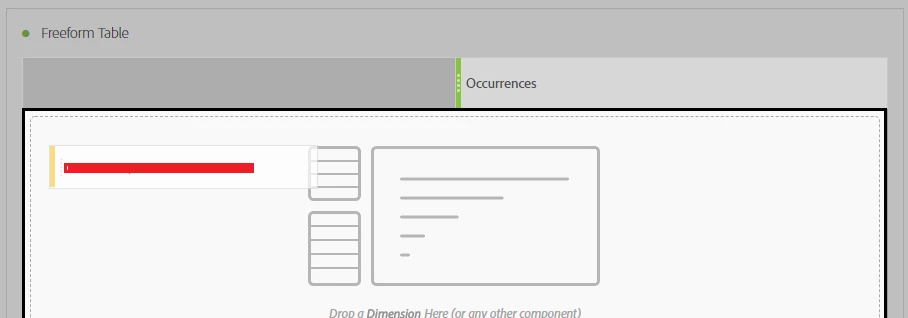
Go to pages dimension and click on the arrow button next to it as shown below.

Now manually drop the pages one by one. It is FIFO basis and first page you have dragged will be at the top.

If there are less numbers of pages, it will be fine. For more line items, it is be more manual.

Thank You

Arun

1 reply

PratheepArunRaj
PratheepArunRajAccepted solution
New Participant
Aug 2, 2018 8:20 AM UTC

Dear Pankaj,

Go to pages dimension and click on the arrow button next to it as shown below.

Now manually drop the pages one by one. It is FIFO basis and first page you have dragged will be at the top.

If there are less numbers of pages, it will be fine. For more line items, it is be more manual.

Thank You

Arun

Translate