How to capture the current date/time into a eVar | Community
Skip to main content
New Participant
July 14, 2017
Solved

How to capture the current date/time into a eVar

  • July 14, 2017
  • 14 replies
  • 11860 views

Hello All,

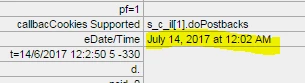
I want to capture and save the current date into a eVar which can be used for reporting and analysis purpose later. I can see that date/time into Adobe debugger. Could anybody please help me to capture the same into a eVar.

Also this timestamp is showing in different time zone even though I have selected my current time zone in report suite settings. Please guide me if this can also be changed to proper timezone.
Regards,

Manish

This post is no longer active and is closed to new replies. Need help? Start a new post to ask your question.
Best answer by EricMatisoff

Here's a great start for you: DTM Examples

It will give you all the details on 'setting a global s object' which DTM does not do out of the box. You can then follow my instructions here for creating the doPlugins area:

https://www.searchdiscovery.com/blog/adobe-dtm-update-let-adobe-manage-measurement-library/

You'll want to set up time parting in doPlugins.

14 replies

EricMatisoff
Employee
June 4, 2018

Hi marion69081899​ - good news! There are now pre-built time parting dimensions in Analysis Workspace! So you won't even need to add this plugin. More details here:

Time-Parting Dimensions

New Participant
June 4, 2018

Hello Everyone !

I've been trying to do this, but since the s.code is not accessible in my implementation, we don't know where to put the plugin.

We have tryed in a data element but the s.code is not accessible ( the error is 's not defined') .

Should we put this on the custom code part of the Tool Definition ?


We don't want to go to every rule we have an add this , so if someone knows something please some help would be appreciated !

Cheers !

EricMatisoff
Employee
July 15, 2017

Agreed with saurabh kumar​ - time parting plugin is the way to go. I also recommend using Classifications to break it out by:

Day of Week, Month, AM v PM, Weekday vs Weekend.

We've had some customers even break it out by Business Day vs non-Business Day. This can be especially interesting for B2B companies. Enjoy!

New Participant
July 14, 2017

Hello Manish,

   One solution is to use getTimeParting plugin & you can get the time in your desired TimeZone captured in an eVar.

var tpA = s.getTimeParting('n','-7');

s.eVarX = tpA.split('|')[0]; // time at minute level

Reference documentation - getTimeParting

Date / Date range you can always choose for the report whenever you run them in Adobe Analytics.

Regards,

Saurabh Kumar.