How to configure % of Page viewed in Launch | Community
Skip to main content
ynxinl55879595
New Participant
July 15, 2019
Solved

How to configure % of Page viewed in Launch

  • July 15, 2019
  • 13 replies
  • 21711 views

Hi all

If need to see % of Page viewed in Analytics, How should I set up my Data elements and  Rules in Launch? thanks

This post is no longer active and is closed to new replies. Need help? Start a new post to ask your question.
Best answer by kumararajak

Hi Yn,

Goto Launch => Web Prperty => Extension => CONFIGURE TRACKER USING CUSTOM CODE => Open Editor, and use the below Plug in code
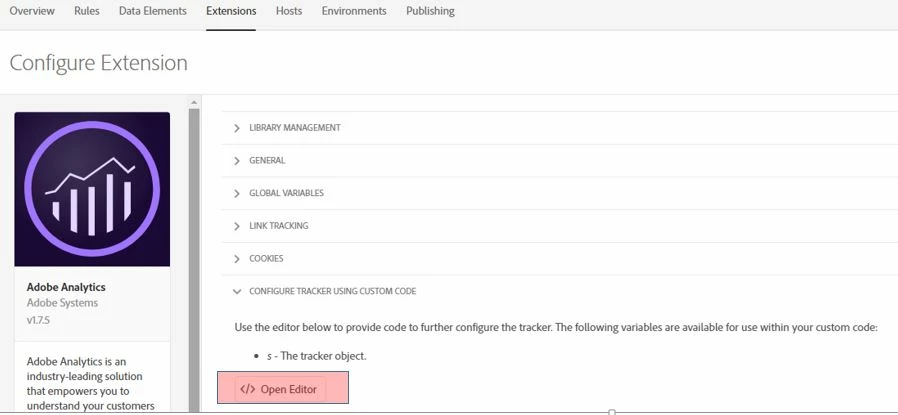
/*

* Plugin: getPreviousValue_v1.0 - return previous value of designated

*   variable (requires split utility)

*/

s.getPreviousValue=new Function("v","c","el",""

+"var s=this,t=new Date,i,j,r='';t.setTime(t.getTime()+1800000);if(el"

+"){if(s.events){i=s.split(el,',');j=s.split(s.events,',');for(x in i"

+"){for(y in j){if(i[x]==j[y]){if(s.c_r(c)) r=s.c_r(c);v?s.c_w(c,v,t)"

+":s.c_w(c,'no value',t);return r}}}}}else{if(s.c_r(c)) r=s.c_r(c);v?"

+"s.c_w(c,v,t):s.c_w(c,'no value',t);return r}");

/*

* Utility Function: split v1.5 - split a string (JS 1.0 compatible)

*/

s.split=new Function("l","d",""

+"var i,x=0,a=new Array;while(l){i=l.indexOf(d);i=i>-1?i:l.length;a[x"

+"++]=l.substring(0,i);l=l.substring(i+d.length);}return a");

/* Adobe Consulting Plugin: getPercentPageViewed v3.01 w/handlePPVevents helper function (Requires AppMeasurement and p_fo plugin) */

s.getPercentPageViewed=function(pid,ch){var s=this,a=s.c_r("s_ppv");a=-1<a.indexOf(",")?a.split(","):[];a[0]=s.unescape(a[0]);

pid=pid?pid:s.pageName?s.pageName:document.location.href;s.ppvChange=ch?ch:!0;if("undefined"===typeof s.linkType||"o"!==

s.linkType)s.ppvID&&s.ppvID===pid||(s.ppvID=pid,s.c_w("s_ppv",""),s.handlePPVevents()),s.p_fo("s_gppvLoad")&&window

.addEventListener&&(window.addEventListener("load",s.handlePPVevents,!1),window.addEventListener("click",s.handlePPVevents, !1),window.addEventListener("scroll",s.handlePPVevents,!1),window.addEventListener("resize",s.handlePPVevents,!1)),s._ppvPreviousPage

=a[0]?a[0]:"",s._ppvHighestPercentViewed=a[1]?a[1]:"",s._ppvInitialPercentViewed=a[2]?a[2]:"",s._ppvHighestPixelsSeen=a[3]?a[3]:""};

/* Adobe Consulting Plugin: handlePPVevents helper function (for getPercentPageViewed v3.01 Plugin) */

s.handlePPVevents=function(){if("undefined"!==typeof s_c_il){for(var c=0,d=s_c_il.length;c<d;c++)if(s_c_il[c]&&

s_c_il[c].getPercentPageViewed){var a=s_c_il[c];break}if(a&&a.ppvID){var f=Math.max(Math.max(document.body.scrollHeight,

document.documentElement.scrollHeight),Math.max(document.body.offsetHeight,document.documentElement.offsetHeight),Math.max(document.

body.clientHeight,document.documentElement.clientHeight));c=(window.pageYOffset||window.document.documentElement.scrollTop||window.document.body.scrollTop)+(window.innerHeight||document.documentElement.clientHeight||document.body.clientHeight);d=Math.min(Math.round

(c/f*100),100);var e="";!a.c_r("s_tp")||a.unescape(a.c_r("s_ppv").split(",")[0])!==a.ppvID||1==a.ppvChange&&

a.c_r("s_tp")&&f!= a.c_r("s_tp")?(a.c_w("s_tp",f),a.c_w("s_ppv","")):e=a.c_r("s_ppv");var b=e&&-1<e.indexOf(",")?e.split(",",4):[];f=0<b.length?b[0]:

escape(a.ppvID);var g=1<b.length?parseInt(b[1]):d,h=2<b.length?parseInt(b[2]):d;b=3<b.length?parseInt(b[3]):c;0<d&&(e=f+","

+(d>g?d:g)+","+h+","+(c>b?c:b));a.c_w("s_ppv",e)}}};

/* Adobe Consulting Plugin: p_fo (pageFirstOnly) v2.0 (Requires AppMeasurement) */

s.p_fo=function(on){var s=this;s.__fo||(s.__fo={});if(s.__fo[on])return!1;s.__fo[on]={};return!0};

/******************************************** END CODE TO DEPLOY ********************************************/

Check more details on getPercentPageViewed

Hope this helps.

Regards,

Kumararaja K

13 replies

New Participant
September 26, 2019

It worked for a while but it stopped working.  I checked the s_ppv cookie is not getting generated.  My Adobe Analytics extension in launch is current v1.7.8 with AppMeasurement 2.17.0 . I have pasted the below coding in the custom code within the Adobe Analytics extension.

s.usePlugins=true

s.doPlugins=function(s) {

    /* Add calls to plugins here */

  if(s.pageName) s.getPercentPageViewed();

if(s._ppvPreviousPage)

{

s.prop7 = s._ppvPreviousPage;

s.prop10 = s._ppvHighestPercentViewed;

s.prop12 = s._ppvInitialPercentViewed;   

}

/******************************************* BEGIN CODE TO DEPLOY *******************************************/

/* Adobe Consulting Plugin: getPercentPageViewed v3.01 w/handlePPVevents helper function (Requires AppMeasurement and p_fo plugin) */

s.getPercentPageViewed=function(pid,ch){var s=this,a=s.c_r("s_ppv");a=-1<a.indexOf(",")?a.split(","):[];a[0]=s.unescape(a[0]);

pid=pid?pid:s.pageName?s.pageName:document.location.href;s.ppvChange=ch?ch:!0;if("undefined"===typeof s.linkType||"o"!==

s.linkType)s.ppvID&&s.ppvID===pid||(s.ppvID=pid,s.c_w("s_ppv",""),s.handlePPVevents()),s.p_fo("s_gppvLoad")&&window

.addEventListener&&(window.addEventListener("load",s.handlePPVevents,!1),window.addEventListener("click",s.handlePPVevents, !1),window.addEventListener("scroll",s.handlePPVevents,!1),window.addEventListener("resize",s.handlePPVevents,!1)),s._ppvPreviousPage

=a[0]?a[0]:"",s._ppvHighestPercentViewed=a[1]?a[1]:"",s._ppvInitialPercentViewed=a[2]?a[2]:"",s._ppvHighestPixelsSeen=a[3]?a[3]:""};

/* Adobe Consulting Plugin: handlePPVevents helper function (for getPercentPageViewed v3.01 Plugin) */

s.handlePPVevents=function(){if("undefined"!==typeof s_c_il){for(var c=0,d=s_c_il.length;c<d;c++)if(s_c_il[c]&&s_c_il[c].getPercentPageViewed){var a=s_c_il[c];break}if(a&&a.ppvID){var f=Math.max(Math.max(document.body.scrollHeight,document.documentElement.scrollHeight),Math.max(document.body.offsetHeight,document.documentElement.offsetHeight),Math.max(document.

body.clientHeight,document.documentElement.clientHeight));c=(window.pageYOffset||window.document.documentElement.scrollTop||window.document.body.scrollTop)+(window.innerHeight||document.documentElement.clientHeight||document.body.clientHeight);d=Math.min(Math.round

(c/f*100),100);var e="";!a.c_r("s_tp")||a.unescape(a.c_r("s_ppv").split(",")[0])!==a.ppvID||1==a.ppvChange&&

a.c_r("s_tp")&&f!= a.c_r("s_tp")?(a.c_w("s_tp",f),a.c_w("s_ppv","")):e=a.c_r("s_ppv");var b=e&&-1<e.indexOf(",")?e.split(",",4):[];f=0<b.length?b[0]:escape(a.ppvID);var g=1<b.length?parseInt(b[1]):d,h=2<b.length?parseInt(b[2]):d;b=3<b.length?parseInt(b[3]):c;0<d&&(e=f+","+(d>g?d:g)+","+h+","+(c>b?c:b));a.c_w("s_ppv",e)}}};

/* Adobe Consulting Plugin: p_fo (pageFirstOnly) v2.0 (Requires AppMeasurement) */

s.p_fo=function(on){var s=this;s.__fo||(s.__fo={});if(s.__fo[on])return!1;s.__fo[on]={};return!0};

/******************************************** END CODE TO DEPLOY ********************************************/

New Participant
September 24, 2019

Its not working in my case. kindly upload output screenshot.

ynxinl55879595
New Participant
August 6, 2019

Dear kumararajak

Thanks for your information.

After disabled Data elements and rules in launch and moved the variables settings to Launch => Web Property => Extension => CONFIGURE TRACKER USING CUSTOM CODE => Open Editor,

Now is working properly!

The plugin referred seems not working very well so I changed to the one in getPercentPageViewed

Thanks so much for your support again.

BR,

Ynxin

kumararajak
New Participant
August 6, 2019

Dear ynxinl55879595

Data element or Rules are not required at all.

All you need to do is,

Goto Launch => Web Property => Extension => CONFIGURE TRACKER USING CUSTOM CODE => Open Editor, and post the below Plug in code

/*

* Plugin: getPreviousValue_v1.0 - return previous value of designated

*   variable (requires split utility)

*/

s.getPreviousValue=new Function("v","c","el",""

+"var s=this,t=new Date,i,j,r='';t.setTime(t.getTime()+1800000);if(el"

+"){if(s.events){i=s.split(el,',');j=s.split(s.events,',');for(x in i"

+"){for(y in j){if(i[x]==j[y]){if(s.c_r(c)) r=s.c_r(c);v?s.c_w(c,v,t)"

+":s.c_w(c,'no value',t);return r}}}}}else{if(s.c_r(c)) r=s.c_r(c);v?"

+"s.c_w(c,v,t):s.c_w(c,'no value',t);return r}");

/*

* Utility Function: split v1.5 - split a string (JS 1.0 compatible)

*/

s.split=new Function("l","d",""

+"var i,x=0,a=new Array;while(l){i=l.indexOf(d);i=i>-1?i:l.length;a[x"

+"++]=l.substring(0,i);l=l.substring(i+d.length);}return a");

/* Adobe Consulting Plugin: getPercentPageViewed v3.01 w/handlePPVevents helper function (Requires AppMeasurement and p_fo plugin) */

s.getPercentPageViewed=function(pid,ch){var s=this,a=s.c_r("s_ppv");a=-1<a.indexOf(",")?a.split(","):[];a[0]=s.unescape(a[0]);

pid=pid?pid:s.pageName?s.pageName:document.location.href;s.ppvChange=ch?ch:!0;if("undefine d"===typeof s.linkType||"o"!==

s.linkType)s.ppvID&&s.ppvID===pid||(s.ppvID=pid,s.c_w("s_ppv",""),s.handlePPVevents()),s.p _fo("s_gppvLoad")&&window

.addEventListener&&(window.addEventListener("load",s.handlePPVevents,!1),window.addEventLi stener("click",s.handlePPVevents, !1),window.addEventListener("scroll",s.handlePPVevents,!1),window.addEventListener("resiz e",s.handlePPVevents,!1)),s._ppvPreviousPage

=a[0]?a[0]:"",s._ppvHighestPercentViewed=a[1]?a[1]:"",s._ppvInitialPercentViewed=a[2]?a[2] :"",s._ppvHighestPixelsSeen=a[3]?a[3]:""};

/* Adobe Consulting Plugin: handlePPVevents helper function (for getPercentPageViewed v3.01 Plugin) */

s.handlePPVevents=function(){if("undefined"!==typeof s_c_il){for(var c=0,d=s_c_il.length;c<d;c++)if(s_c_il[c]&&

s_c_il[c].getPercentPageViewed){var a=s_c_il[c];break}if(a&&a.ppvID){var f=Math.max(Math.max(document.body.scrollHeight,

document.documentElement.scrollHeight),Math.max(document.body.offsetHeight,document.docume ntElement.offsetHeight),Math.max(document.

body.clientHeight,document.documentElement.clientHeight));c=(window.pageYOffset||window.do cument.documentElement.scrollTop||window.document.body.scrollTop)+(window.innerHeight||doc ument.documentElement.clientHeight||document.body.clientHeight);d=Math.min(Math.round

(c/f*100),100);var e="";!a.c_r("s_tp")||a.unescape(a.c_r("s_ppv").split(",")[0])!==a.ppvID||1==a.ppvChange&&

a.c_r("s_tp")&&f!= a.c_r("s_tp")?(a.c_w("s_tp",f),a.c_w("s_ppv","")):e=a.c_r("s_ppv");var b=e&&-1<e.indexOf(",")?e.split(",",4):[];f=0<b.length?b[0]:

escape(a.ppvID);var g=1<b.length?parseInt(b[1]):d,h=2<b.length?parseInt(b[2]):d;b=3<b.length?parseInt(b[3]):c ;0<d&&(e=f+","

+(d>g?d:g)+","+h+","+(c>b?c:b));a.c_w("s_ppv",e)}}};

/* Adobe Consulting Plugin: p_fo (pageFirstOnly) v2.0 (Requires AppMeasurement) */

s.p_fo=function(on){var s=this;s.__fo||(s.__fo={});if(s.__fo[on])return!1;s.__fo[on]={};return!0};

/******************************************** END CODE TO DEPLOY ********************************************/

Once done,

Goto Launch => Web Property => Extension => CONFIGURE TRACKER USING CUSTOM CODE => Open Editor, and post the below code under s.doplugin section

The above will definitely works.

Regards,

Kumararaja K

ynxinl55879595
New Participant
August 6, 2019

Dear Kumarajak

It would be really appreciated, thanks

BR

Ynxin

kumararajak
New Participant
August 5, 2019

Dear ynxinl55879595

Sure, i can help you on this, bit busy today. i'll post my detailed comment by end of today,

Regards,

Kumararaja K

ynxinl55879595
New Participant
August 5, 2019

Dear Kumararaja

After followed the instrustions (added plugin, and Launch configurations are as follow)

There are 2 main issues popped up:

1.  It created duplicate server calls that caused extra page views

2. The dev report shows as follow: all s._ppvHighestPercentViewed and s._ppvInitialPercentViewed share the same value while my web pages cannot be completely visible when they load. 

Could you kindly help explain how to set up properly? Thanks.

kumararajak
New Participant
July 24, 2019

Dear Srijith,

Yes, you need to assign some props/evars. modify the following script per your requirement

/* ******** prop01 & eVar01 Initial - Highest percentage page viewed (previous Page) ******** */

if(s.pageName) s.getPercentPageViewed();

if(s._ppvPreviousPage)

{

s.eVar01 = s._ppvHighestPercentViewed + "|" + s._ppvInitialPercentViewed;

}

if (s.eVar01) {

s.prop01 = 'D=v01';

}

Regards,

Kumararaja K

srijithkumarkb
New Participant
July 24, 2019

Hi Kumararajak,

This is regarding the % of page viewed plugin code you have provided. Just one question, We just need to paste this code in the tracker right, do we have to assign to some prop or evar or does it automatically capture the values where in Analytics reports do we see this info

Sorry If I am asking the very basic question.

Thanks

Srijith

ynxinl55879595
New Participant
July 15, 2019

Hi Kumararaja

Thanks, it definatly helps.