How to find out which (landing) page drives the most conversions as well as the conversion rate? | Community
Skip to main content
New Participant
Jul 26, 2020 2:52 PM UTC
Solved

How to find out which (landing) page drives the most conversions as well as the conversion rate?

Hi, I am new to Adobe Analytics. Previously, I was using Google Analytics


In Adobe Analytics, I have set up a lead gen goal for users who landed on the thank you page.


However, I'm not sure how to manipulate the data and metrics to show the conversion rate. In Google Analytics, the goal conversion rate for the respective (landing) pages are shown automatically, but it seems like a bit of additional work is needed for adobe analytics. Hope my question makes sense.


How can I implement or manipulate the data in Adobe Analytics to show this?
This post is no longer active and is closed to new replies. Need help? Start a new post to ask your question.
kainthAccepted solution
Level 6
Jul 27, 2020 7:01 AM UTC

Hi @swong2 ,

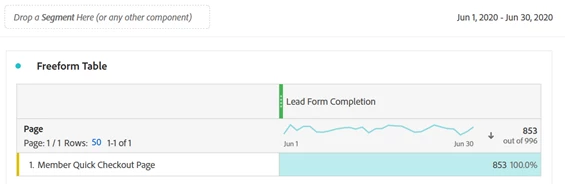
You can use the Page dimension in Analytics along with the custom event which you are using to track your leads as shown below.


Note: Leads Form Completion is a custom event in the above screenshot.


Hope this helps.


Regards,
Abhinav

8 replies

jantzen_b
Employee
Sep 16, 2020 6:32 PM UTC
Do any of the answers below answer your initial question? If so, can you select one of them as the correct answer? If none of the answers already provided answer your question, can you provide additional information to better help the community solve your question?
Translate
New Participant
Jul 31, 2020 5:11 PM UTC

Hi @swong2 ,

You can use the Page dimension in Analytics along with the custom event. You could also use the visits metric as your success metric with the page dimension. It sounds like the visit would only get to the page if they successfuly landed on the thank you page so it should align closely with your custom event.

Translate
Employee
Jul 28, 2020 6:03 AM UTC

Hi @swong2 ,

You can drag-drop the dimension capturing the landing page along with the metric (lean gen event) in a freeform table in Analysis Workspace.

Thanks!

Translate
Employee
Jul 27, 2020 10:37 AM UTC

 Hi @swong2 ,

Adding to earlier responses by @kainth and @megha2390 , you will need to first decide on the metric that you are using to capture the conversion for your site. It seems you must be capturing the conversion in an event (like, lead gen) - in that case you can use the metric along with the "Thank You" landing page to show the desired result.

Thank you!

Translate
swong2Author
New Participant
Jul 28, 2020 6:00 AM UTC
Yes, I already have the lead gen event set up on my adobe account. However, like how Google Analytics shows shows the Goal Conversion Rate on the Landing Page report, where the conversion rate is shown for each landing page url, I also wish to do the same on Adobe Analytics. How do I configure my Workspace to show that?
Translate
kainthAccepted solution
Level 6
Jul 27, 2020 7:01 AM UTC

Hi @swong2 ,

You can use the Page dimension in Analytics along with the custom event which you are using to track your leads as shown below.


Note: Leads Form Completion is a custom event in the above screenshot.


Hope this helps.


Regards,
Abhinav

Translate
New Participant
Nov 13, 2024 2:45 PM UTC

I have a similar problem, but here in your answer it looks like that covers all Visits (/sessions) where the Visitor (/user) viewed that page and also triggered a Lead Form Completion in the same Visit.


However, "Landing Page" is generally considered to be the FIRST page in a user's session, not just a page which the user viewed at any point within the same Visit. Is there a way to break down by Landing Page (i.e. the first page in the Visit) and see performance of a conversion against that?


Thanks in advance, and let me know if I've missed something in the original answer.

Translate
Level 4
Jul 26, 2020 7:14 PM UTC

You can run Pages report against Event capturing Lead generation. In case you want to look at the URL being used, you need to first capture page URL in a variable as page url is not available bydefault in R&A and Workspace.

Translate