How to get unique page views or unique visitors in Customer Journey Analytics (2023)? | Community
Skip to main content
New Participant
August 18, 2023
Solved

How to get unique page views or unique visitors in Customer Journey Analytics (2023)?

  • August 18, 2023
  • 1 reply
  • 1629 views

Hi All, 


My company transitioned from Google Analytics to Customer Journey Analytics in July 2023. In Google Analytics, I recorded unique page views, not total page views. How can I find unique views in CJA? Alternatively, is there a way to find unique visitors?


I have seen older questions on this platform that attempt to answer my question, but the features mentioned are no longer available in CJA. 

This post is no longer active and is closed to new replies. Need help? Start a new post to ask your question.
Best answer by Jennifer_Dungan

I don't have CJA, but it should be similar to Adobe Analytics, they have a lot of similarities and are based on a lot of the same architecture.


Basically, you just need to use "non-repeating instances" in a segment definition:


Here I use the "Page" Dimension, which when you start will look like


Since I am not looking for a specific page, I change it from "equals" to "exists"


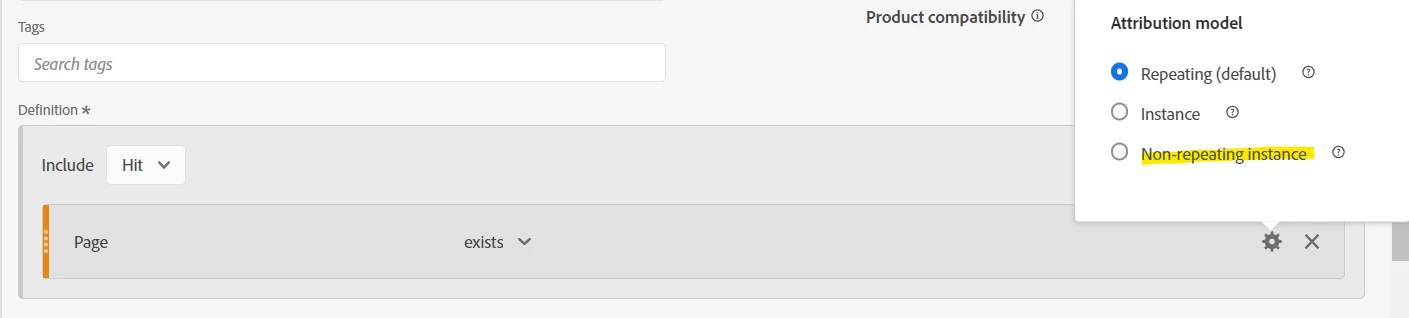
The last step is to select the gear on the dimension, and select "Non-Repeating Instance":


Now you can stack this segment with your Page View Metric, and even put it side by side with Page Views to see the difference:


1 reply

Jennifer_Dungan
Jennifer_DunganAccepted solution
New Participant
August 18, 2023

I don't have CJA, but it should be similar to Adobe Analytics, they have a lot of similarities and are based on a lot of the same architecture.


Basically, you just need to use "non-repeating instances" in a segment definition:


Here I use the "Page" Dimension, which when you start will look like


Since I am not looking for a specific page, I change it from "equals" to "exists"


The last step is to select the gear on the dimension, and select "Non-Repeating Instance":


Now you can stack this segment with your Page View Metric, and even put it side by side with Page Views to see the difference: