Solved
How to install Google analytics 4 using Adobe launch?
How to install Google analytics 4 using Adobe launch? Can somebody tell easy and efficient way for this?
How to install Google analytics 4 using Adobe launch? Can somebody tell easy and efficient way for this?
I use a Launch extension called "Google Global Site Tag (gtag)"
When you configure it, you can add any number of Google type accounts: UA, GA4, Google Ads, etc...
Click on "Add Account"
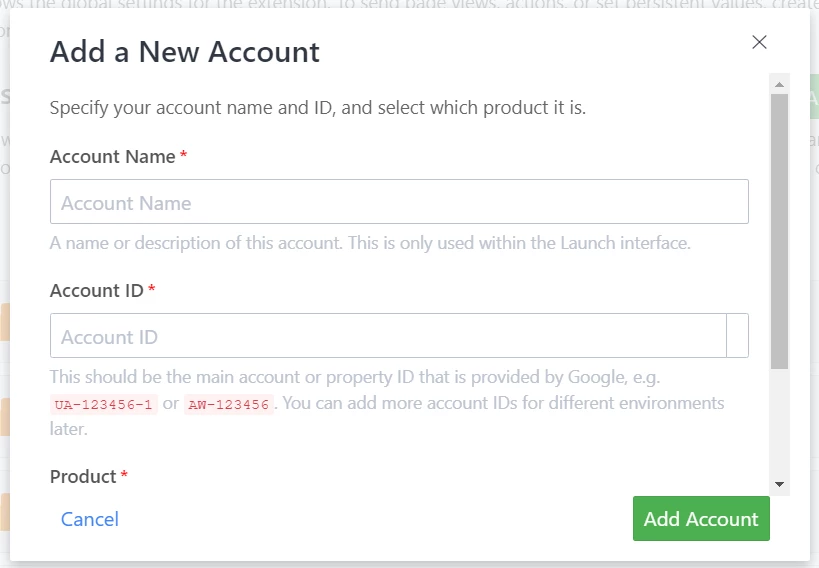
When you enter a GA4 account, it will automatically set the "product".. you just need to provide a name (which is just for you to identify your various accounts from one another when you use them.
Once you create the account, you can set up Account IDs for Dev and Staging and Prod (you can even replace the Prod one you added with Data Element if you want)
If you are trying to set up GA4 parameters that you want on ALL calls (you can add parameters that you only want on certain events later) you can set them in Custom Data Fields.
Once you have the extension and the accounts set up, you can use these in rules.
You have a few options, to choose from:
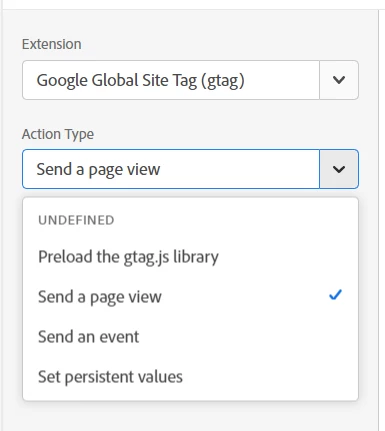
All your accounts will show up here, but you only need to turn on the one you want in this context. Similar to the extension config, you can configure parameters to these events here too
Enter your E-mail address. We'll send you an e-mail with instructions to reset your password.