Solved
How to pull revenue by DMA by day?
Hi-
I was wondering if there was an easy way to pull revenue by day by DMA over a span of time? I am having a trouble getting to this view even in the Data Warehouse when I select "daily" breakdown.
Hi-
I was wondering if there was an easy way to pull revenue by day by DMA over a span of time? I am having a trouble getting to this view even in the Data Warehouse when I select "daily" breakdown.
Since I am not sure what kind of view you are looking for, have you tried the API?
https://adobedocs.github.io/analytics-2.0-apis/
If you can get the view you want in Workspaces, you can get the APIs that build that out, and still manipulate them if its close but not exact.. but it's a little easier sometimes to get the API call that is close to what you need and tweak it then to start from scratch.
To get the API calls made by Workspace, you have to first turn on Debugging:
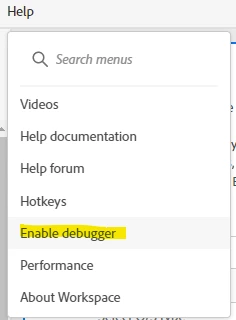
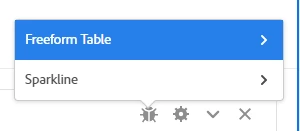
This will add a new icon to your Tables:

Clicking on that new icon will give you an option for the Table or the Sparkline (choose the Table):
Now you will be presented with Timestamps for each API call made:
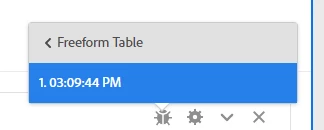
When you choose this, you will be taken to a page showing the API call in multiple formats such as JSON and CURL.
If your Table is complex, you may need to run multiple API calls, as the system works on this structure of calling each breakdown in a separate call.
Enter your E-mail address. We'll send you an e-mail with instructions to reset your password.