In workspace, how to set to get "Full Week" data only? | Community
Skip to main content
Level 7
Nov 3, 2020 1:45 PM UTC
Solved

In workspace, how to set to get "Full Week" data only?

The date duration is set to "This Quarter", dimension by "Week".

But the data will be refreshed once the new week reaches.

Is there a way to get new week data only when the full week completes?
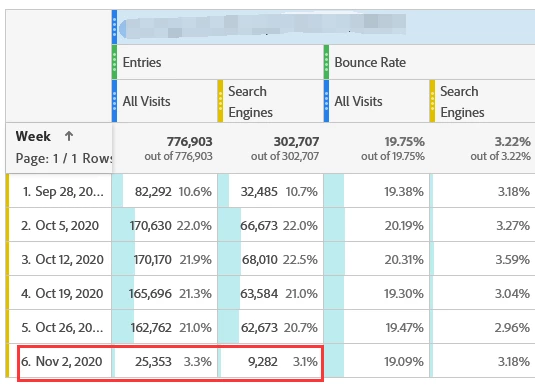
 

Asking this is because the dashboard is scheduled a weekly delivery, according to current situation, we either will not get the full data if the schedule is earlier (last full week not completes), or will not get the full data for the current new week on the "number" area.
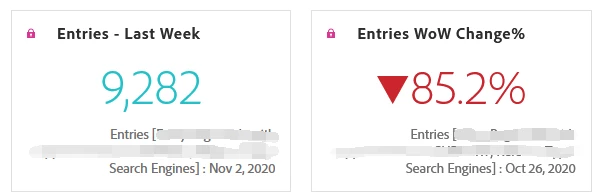
 

Please help to share your ideas.

Thanks for advance.

This post is no longer active and is closed to new replies. Need help? Start a new post to ask your question.
khurshid
khurshidAccepted solution
Employee
Nov 3, 2020 8:29 PM UTC

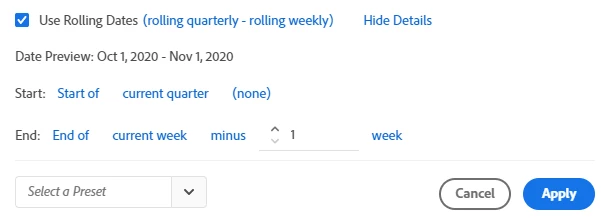
Try creating a Custom Date Range such as this:


3 replies

khurshid
khurshidAccepted solution
Employee
Nov 3, 2020 8:29 PM UTC

Try creating a Custom Date Range such as this:


Translate
H_LAuthor
Level 7
Nov 6, 2020 2:17 PM UTC
Thank you!
Translate
Andrey_Osadchuk
Level 10
Nov 3, 2020 3:28 PM UTC

Set a rolling date range in the panel to include only past weeks.

 
Best wishes,
Andrey Osadchuk | Launch Inspector, Analytics Connector, Bookmarks
Translate