Interactive dropdown list automatically updated in a panel | Community
Skip to main content
Level 3
Jan 14, 2022 9:58 AM UTC
Solved

Interactive dropdown list automatically updated in a panel

Hi,

In a panel there is a possibility to create dropdown list with drag and drop + SHIFT:

 

It’s working as expected but I want to have in my drop down all possibilities that can be contained in the dimension Search Term.

I know it’s possible by adding them one by one:
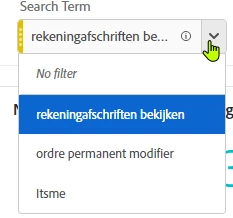
 

If I drop the dimension, the filter is only about this dimensions exists:

 

But in my case I want to make it dynamic, meaning, I want to have all possible values that can be contained in this dimension: if a new value is present, it’s automatically added in the dropdown.

How can I do that?


Thanks


Robin

This post is no longer active and is closed to new replies. Need help? Start a new post to ask your question.
khurshid
khurshidAccepted solution
Employee
Jan 24, 2022 2:33 PM UTC

Creating a segment dropdown with all the available values in a dimension is not supported. A dimension can have 1000s of values, so creating a dropdown with all those values are not possible. 

2 replies

khurshid
khurshidAccepted solution
Employee
Jan 24, 2022 2:33 PM UTC

Creating a segment dropdown with all the available values in a dimension is not supported. A dimension can have 1000s of values, so creating a dropdown with all those values are not possible. 

Translate
Level 3
Feb 28, 2024 7:49 AM UTC

Hi, with a new release of Adobe, the dynamic dropdown can also be a solution but not sure about the limitation
Here is the video: https://youtu.be/HkB25imh4og

Translate