
Is there a way to change text color in Workspace back to the default color? | Community
Skip to main content
_bel_
New Participant
December 28, 2021
Solved

Is there a way to change text color in Workspace back to the default color?

  • December 28, 2021
  • 3 replies
  • 1238 views

I have several instances of dashboards where I included notes, descriptions, text boxes, etc. and have occasionally selected a color for the text only to change my mind. Once you change it, it seems there's no going back? I selected black, but this does not change to a readable color when I switch to dark mode so I'm stuck.
This post is no longer active and is closed to new replies. Need help? Start a new post to ask your question.
Best answer by RaawiMahendru

Hey @_bel_ 


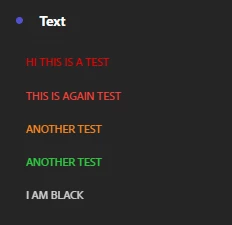
I tested this and I found that black colour changes to white automatically, see below for instance the last line "I am Black" :

3 replies

RaawiMahendruAccepted solution
New Participant
February 4, 2022

Hey @_bel_ 


I tested this and I found that black colour changes to white automatically, see below for instance the last line "I am Black" :

Kishore_Reddy
New Participant
December 29, 2021

Can you try duplicating the visualization (as in the text component) in the same panel and see if the behavior changes?

yuhuisg
New Participant
December 29, 2021

This sounds like a bug that should be raised with Client Care, so that they can get the Analytics team to fix it.