Issue/defect with Summary Number visualization? | Community
Skip to main content
New Participant
December 18, 2023
Solved

Issue/defect with Summary Number visualization?

  • December 18, 2023
  • 2 replies
  • 983 views

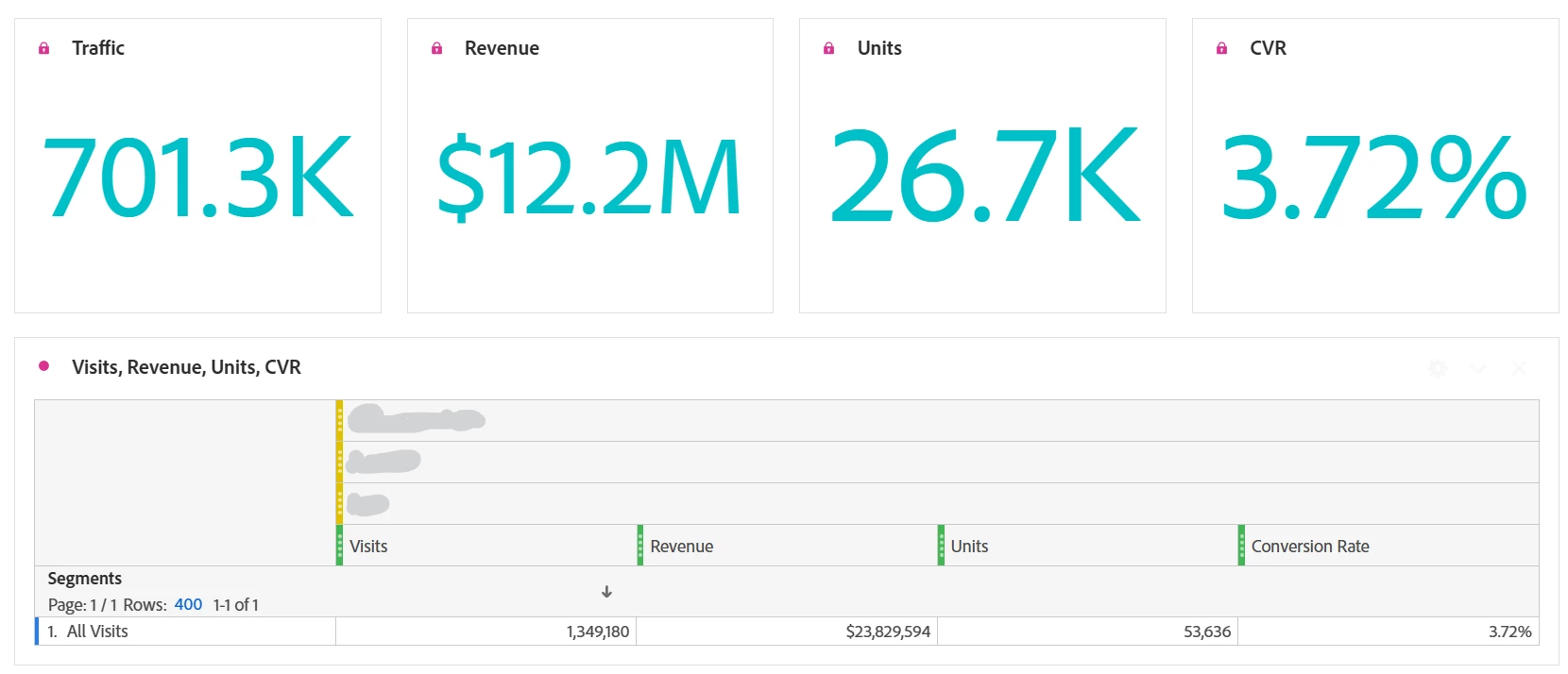
Hi. Sometime late last week, the Summary Number visualizations used in our reports started displaying numbers that are not reflected in their source table (screenshot below). No manual edits were made to these reports so I'm assuming that this was caused by something on the Adobe side. I'm seeing this issue across all our report suites. Is this a known issue? If so, is there a fix in place? I'd prefer to not have to manually fix these (numerous) reports due to something we didn't cause. Thanks.



This post is no longer active and is closed to new replies. Need help? Start a new post to ask your question.
Best answer by Jennifer_Dungan

It was a long shot...  😞


At this point, you could try client care, but I feel to get your reports fixed sooner rather than later, you will likely have to update all the cell references again 😞


Adobe will be in holiday shutdown soon, and while they will have staff available for critical issues, this won't make the list....

2 replies

Jennifer_Dungan
New Participant
December 19, 2023

That is very strange indeed.. I too have not seen this issue. It might be worth a ticket to client care... they may be able to see something in the backend logs that impacted the processing of those visualizations?


I agree, having to go back and update all your reports does not sound like a fun experience... 


Just out of curiosity, if you use the Project > Refresh Project, does that force the data to load the proper table cell data? It's a long shot, I don't think that will do anything, but worth a shot....

tsherwiAuthor
New Participant
December 19, 2023

Thanks for your response. I did try refreshing the Project and with no luck =(

Jennifer_Dungan
Jennifer_DunganAccepted solution
New Participant
December 20, 2023

It was a long shot...  😞


At this point, you could try client care, but I feel to get your reports fixed sooner rather than later, you will likely have to update all the cell references again 😞


Adobe will be in holiday shutdown soon, and while they will have staff available for critical issues, this won't make the list....

RobertBlakeley
New Participant
December 18, 2023

I checked a number of our dashboards. I could not see this issue. It does not mean there isn't an issue, only that it is not affecting our summary numbers in our dashboards.