Issue exporting Avg. Time On Site into a spreadsheet | Community
Skip to main content
Level 2
Sep 29, 2023 5:44 PM UTC
Solved

Issue exporting Avg. Time On Site into a spreadsheet

When I export a .cvs from Adobe Analytics, the Average Time On Site columns have a strange number in those cells instead of an actual time reference from the online project. Should I be able to export actual time references for Average Time On Site? Is there a reason why this is happening? Is there a way to translate the strange exported numbers into a valid time format? 
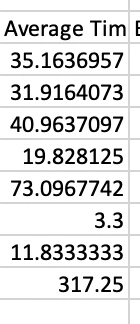
So far, my only work-around is to delete these numbers and manually type them in from looking at the Adobe Analytics project (because also I cannot copy and paste figures from Adobe Analytics either). 

I also took screenshots of each section and used Apple Photos or Preview to copy the text for each column I needed to add the figures for. 


There has to be a better way. I searched and found nothing online about this. I searched the forum here and found nothing. I'm really hoping that I'm just missing something here cause my eyes are bleeding from doing this last night.

 

This post is no longer active and is closed to new replies. Need help? Start a new post to ask your question.
Jennifer_Dungan
Jennifer_DunganAccepted solution
Level 2
Sep 30, 2023 2:10 AM UTC

I believe that the values may be exported as seconds.. if you are looking at the data in Excel, you can convert using this formula:


=[cell]/(60*60*24)


Then formatting that result with a custom format

m:ss

3 replies

Jennifer_Dungan
Jennifer_DunganAccepted solution
Level 2
Sep 30, 2023 2:10 AM UTC

I believe that the values may be exported as seconds.. if you are looking at the data in Excel, you can convert using this formula:


=[cell]/(60*60*24)


Then formatting that result with a custom format

m:ss
Translate
Level 2
Oct 2, 2023 11:03 PM UTC

Thanks so much!

Translate
Jennifer_Dungan
Level 2
Oct 3, 2023 4:19 AM UTC

You're welcome 🙂

Translate