Mobile browser "None" | Community
Skip to main content
Level 4
Oct 4, 2021 1:16 PM UTC
Solved

Mobile browser "None"

Hi Community,

I'm asking your help because I'm seeing a lot of "None" browsers in my reports for mobile devices.

It seems to be weird as all browsers are located at the same place (Courbevoie, a city near to Paris).

See the screenshot below:
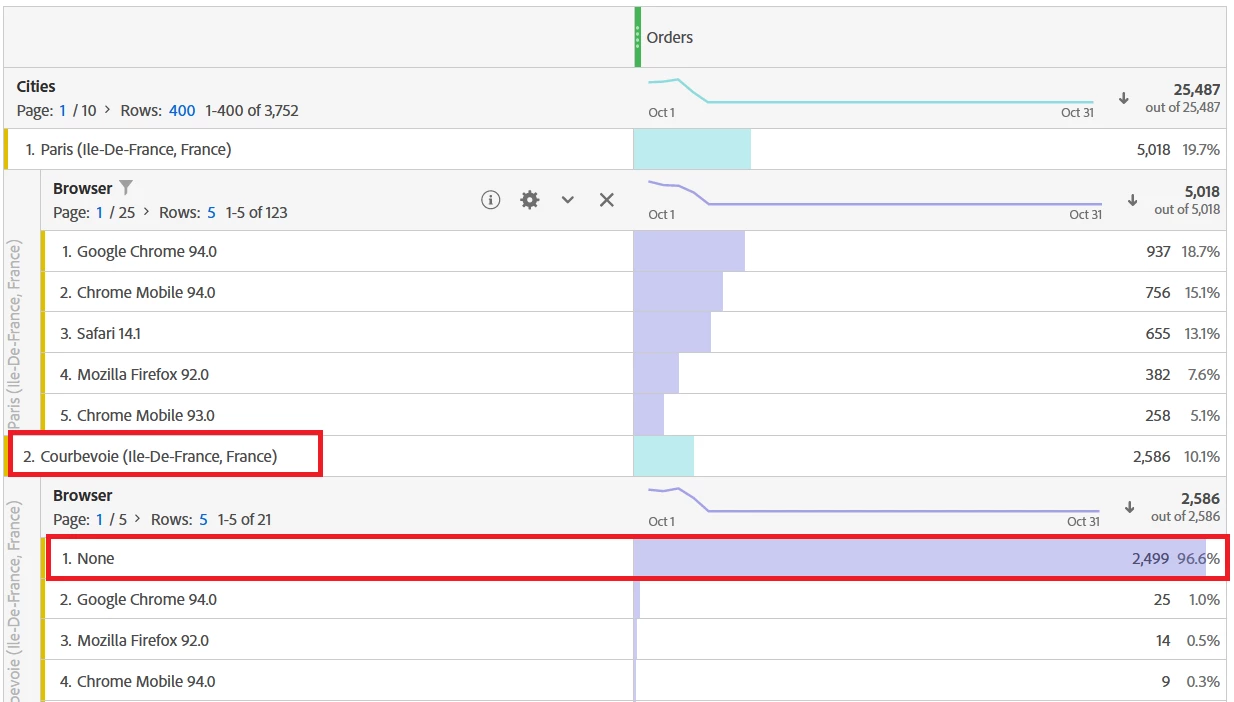
Also, I check a bit in reports to understand why I get this kind of data, it seems that the Session is restarting when the user land on a page tracked "server-side".

Until now, only few pages of my website are being tracked through server-side technology. Is there a correlation between these 2 elements? If you have any suggestions for investigation, it will be really helpful.

Thank you very much.

This post is no longer active and is closed to new replies. Need help? Start a new post to ask your question.
khurshid
khurshidAccepted solution
Employee
Oct 5, 2021 2:39 PM UTC

If the browser id None, that means the data was sent via Data Sources or Data Insertion APIs. Since the page shows "server-side", I guess it is Data Insertion. Can you check internally? You may also check data feed column hit_source and code_ver to validate the source.

7 replies

Swanan_Author
Level 4
Oct 14, 2021 9:23 AM UTC

Hi @khurshid, @pablo_childe,


Thanks again for your advices on this topic.

@khurshid I'm still waiting a feedback from my team about the documentation you told me to check.


In the meantime, I would like to add the fact that this issue is happening only on server-side tracked pages.

Even when the entry page is tracked server-side. So it's not a matter of "restarting session" as I mentioned first.


And so I can't use @pablo_childe solution to use Transaction IDs to match the customer journey as sometimes the visitor only sees server-side tracked pages.

Does it change anything in your recommendations? Do you have any other suggestions that I could investigate?


Thank you for your help.

Translate
khurshid
Employee
Oct 14, 2021 10:41 AM UTC

@swanan_ It does not change anything in my comments. I still believe this could be due to Data Insertion APIs being used in server side pages. 

Translate
Swanan_Author
Level 4
Oct 14, 2021 1:01 PM UTC

Ok thank you, I'll wait the feedback from my team then, thank you !

Translate
khurshid
khurshidAccepted solution
Employee
Oct 5, 2021 2:39 PM UTC

If the browser id None, that means the data was sent via Data Sources or Data Insertion APIs. Since the page shows "server-side", I guess it is Data Insertion. Can you check internally? You may also check data feed column hit_source and code_ver to validate the source.

Translate
Swanan_Author
Level 4
Oct 5, 2021 2:56 PM UTC

Hi @khurshid,


Thanks for your advices ! I'll double check this with my team.

Translate
Pablo_Childe
New Participant
Oct 4, 2021 2:16 PM UTC

Do you capture transaction ID as well? If you did try and compare the IDs and see if you can correlate it to a specific customer...


Translate