Monthly Performance Dashboard Issue | Community
Skip to main content
New Participant
September 17, 2025
Question

Monthly Performance Dashboard Issue

  • September 17, 2025
  • 2 replies
  • 262 views


Hi,

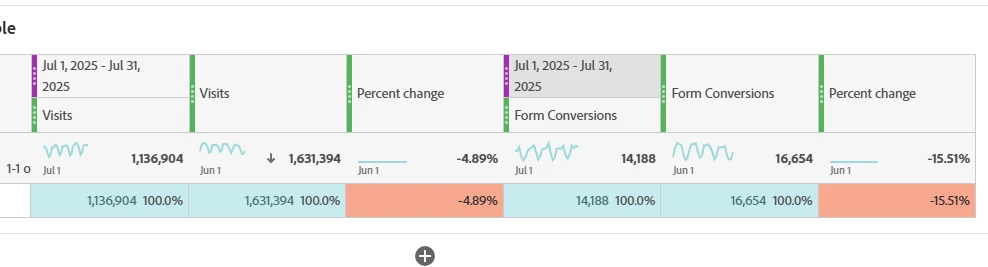
I am trying to create a monthly performance dashboard to compare last month’s performance with the month before. To analyze metrics like visits month over month, I am using the "compare time period" feature. However, I’ve noticed that the comparison of visits and the percent change do not update automatically each month, which leads to incorrect data comparisons. Is there a fix for this issue, or is this feature functioning as expected?


2 replies

New Participant
September 18, 2025

Hi,
You could set up a report with a relative date range (e.g., “This Month”, “Last Month”, "2 months ago", etc.) instead of fixed months in the freeform. When setting this up, the date ranges automatically update each time the report runs. This avoids manual intervention every time you want to look at the data, also ensures that the comparison keeps shifting as the months progress.


Hope this helps!


Jennifer_Dungan
New Participant
September 18, 2025

Yes, but the screenshot shows that the date ranges they were using are rolling though... 


The difference is that they are the date ranges that are created by the system when you use the right click "compare time periods" (often Adobe will show the ever changing date span, instead of "last month"... but it's the same definition in use). Yes, you can make your own comparisons using the present date ranges, and then do your own percent change column between the two... but I am not sure that is going to fix the issue (cause it should end up identical what they already have).


As I mentioned, from the screenshot, what we could see was correct and rolling, meaning that there shouldn't be an issue... unless the panel was in a "locked" date state. So the "rolling dates" aren't moving forward because they are always changing to calculate against a static month at the panel level. We can't see enough of the report at this time.

Jennifer_Dungan
New Participant
September 17, 2025

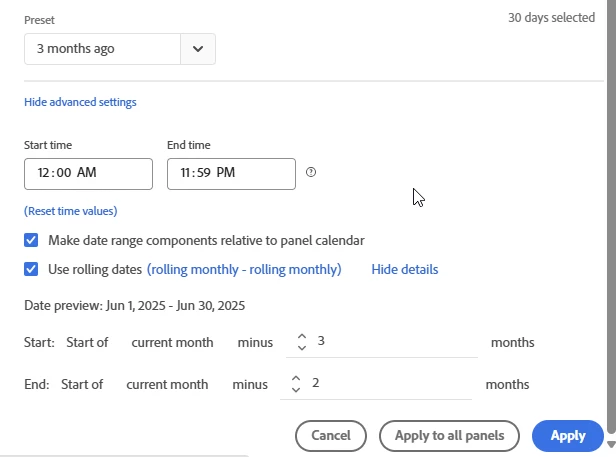
The date ranges are showing "rolling dates" so they should be working... you shouldn't have to adjust them each month.


I assume you used Previous Month to this Date Range, when you built your table... is your Panel range actually set to rolling? (i.e. is set to "Last Month", or did you manually select last month without indicating "rolling"?)


This is the only thing I can think of offhand that might be causing the issue... even with your comparison date range being rolling, if the panel is locked to a specific time frame, then the "rolling comparison" will be relative to the locked range...