Multiple Dimensions columns in Adobe Workspace | Community
Skip to main content
New Participant
March 29, 2018
Approved

Multiple Dimensions columns in Adobe Workspace

  • March 29, 2018
  • 81 replies
  • 78899 views

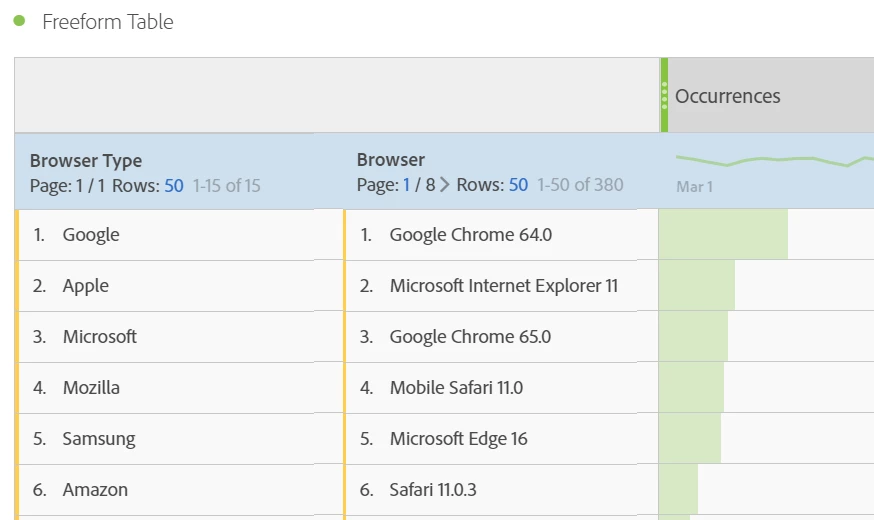
It would be great to be able to have multiple dimension columns rather than having the information stacked. Currently whenever you breakdown dimensions it stacks this on a line by line basis which makes it harder to analyse and also looks messy for the end user.

Example below
81 replies

New Participant
August 5, 2022

Yep, same here. The only way you can get around it is if you put browser type in one evar and then have browser type and browser in another separate evar.  Or for the customer wanting products.... product names in one evar and then have product name and product number concatenated in another evar. 

evar1 =  browser type

evar2 = browsertype-_-browser


Or


evar1 = product name

evar2 = product name-_-product number. 


This would be the equivalent of what I had to do for campaigns with multiple parameters. You have to make each one it's own parameter and then stuff multiple parameters into individual evars so that you can see it however you need to see it on a multiple dimension level (rows) without breakdowns.


An old coremetrics example:  cm_mmc=vendor-_-category-_-placement-_-item

evar1=vendor

evar2=vendor-_-category

evar3=vendor-_-category-_-placement

evar4=vendor-_-category-_-placement-_-item


Reports dimensional rows come out like the above, example:

evar2 report would be  GooglePLAs-_-Dresses

evar3 would look like GooglePLAs-_-Dresses-_-ShortDresses


Using filters you might have one report with multiple vendors and when you download any of the reports you can use excel "text to column" to break it apart using "-" as the delimiter. Then sort however you need. 


But this is all a pain we should not have to endure. Adobe should have the ability to display a minimum of three dimensions on one row in flat file without having to download a breakdown of hierarchy data. 


New Participant
July 25, 2022

My company is switching over from GA to Adobe and I am baffled that this is not already a feature.  People have been requesting a tabular format for 4 years now.  Does anyone have any more workarounds since Adobe can't seem to figure this one out?

New Participant
June 20, 2022

It's not what we've been asking for but it is an alternative that helps get us closer to what we're asking for. https://www.claravine.com/2022/05/17/multiple-dimension-report-adobe-analytics/

New Participant
June 20, 2022

Agree.. It's surprising this hasn't been solutioned by now.

New Participant
May 24, 2022

Bumping this as well. C'mon Adobe, don't make us go to GA.

New Participant
May 2, 2022

This one seems super simple and long-overdue.  So many use cases for it and this is ultimately a feature gap that pushes folks into using a visualization software, like Tableau.  Not only would like feature clean up the table, but it would also allow for more advanced sorting. 

jonathank511882
New Participant
May 2, 2022

Just adding another vote towards needing this.


My use case is showing a product number and product name side by side. I'd like to have both of these dimensions side by side so when I share reports everyone can use the column that's easiest for them.

New Participant
March 30, 2022

Adding my voice to the list of people clamouring for this.

New Participant
March 8, 2022

Adding another vote to prioritize this request. Not being able to view dimension columns side-by-side has consistently been an extreme inconvenience for me since I've started using Adobe Analytics.

New Participant
March 3, 2022

Astonishing that this is not available...