New DataLayer for Product Comparison | Community
Skip to main content
New Participant
March 8, 2019
Solved

New DataLayer for Product Comparison

  • March 8, 2019
  • 3 replies
  • 2085 views

I have several products in the shop and on a subpage it is possible to compare the products.

Like e.g.
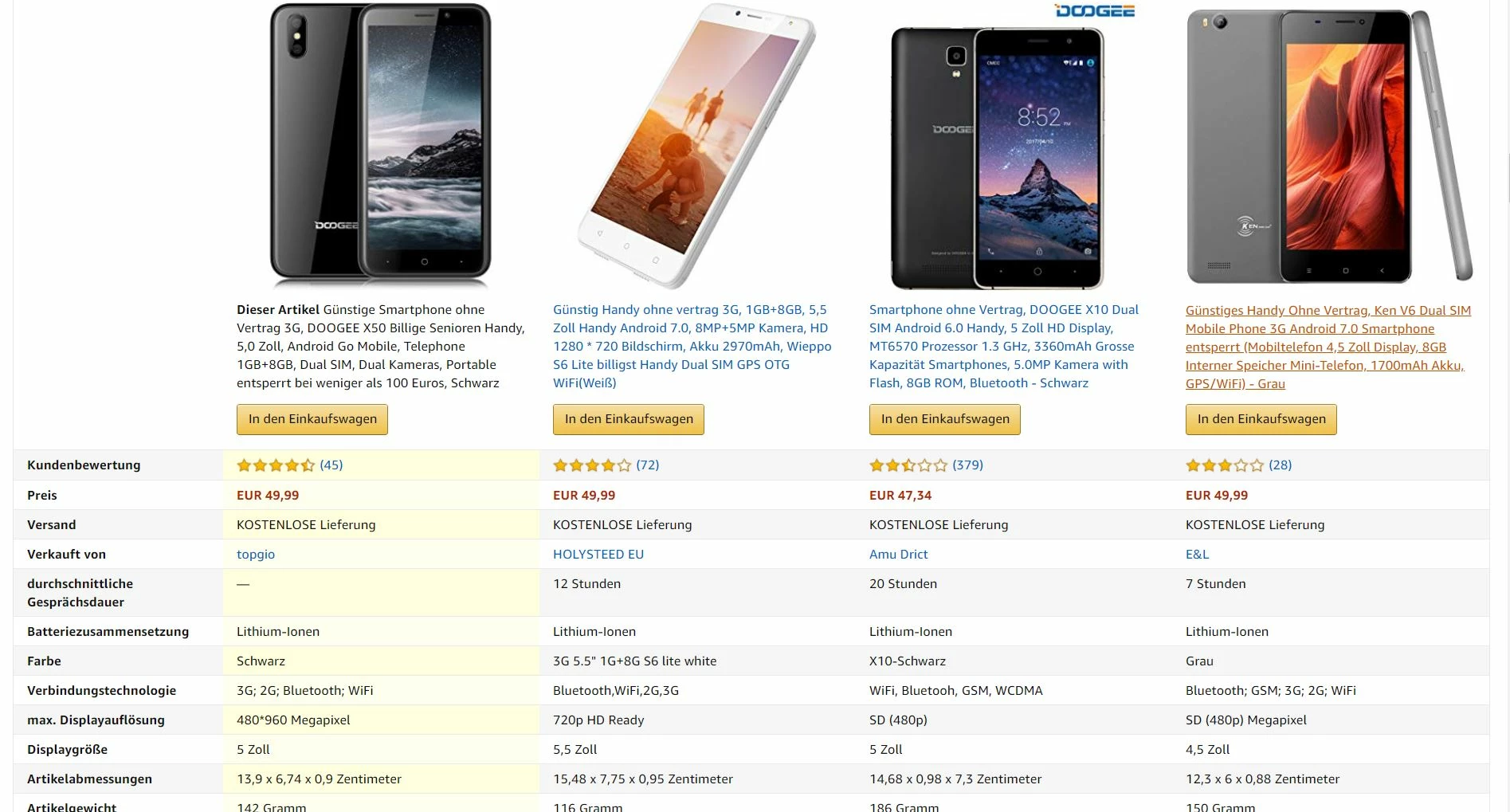
My question: What does the DataLayer have to look like in order to realize this?

Would such a DataLayer be possible?

digitalData.ProductComparison = {

ComparisonInfo: {

ProductName1: "xxx",

ProductName2: "xxx",

ProductName3: "xxx",

ProductName4: "xxx",

ComparisonDisplayAll:"5-4.5-5.5",

ComparisonBrandAll:"brand1_brand2_brand3",

ComparisonPriceAll:"price1_price2_price3",

}

}

Thx.

This post is no longer active and is closed to new replies. Need help? Start a new post to ask your question.
Best answer by Asheesh_Pandey

In place for going flat, It would be easy to create an array of product details i.e. somewhat similar to below...

digitalData = {

    comparisonInfo: [{

            productName: "xxx1",

            comparisonDisp: 5,

            comparisonBrand: "brand1",

            comparisonPrice: "price1"

        },

        {

            productName: "xxx2",

            comparisonDisp: 4.5,

            comparisonBrand: "brand2",

            comparisonPrice: "price2"

        },

        {

            productName: "xxx3",

            comparisonDisp: 5.5,

            comparisonBrand: "brand3",

            comparisonPrice: "price3"

        },

        {

            productName: "xxx4",

            comparisonDisp: 4,

            comparisonBrand: "brand4",

            comparisonPrice: "price4"

        }

    ]

}

Then use the forEach loop to iterate through it; change the key name in the code below to get value for different keys. eg. to get value for "comparisonBrand" comparisonBrand"

var foo = []

digitalData.comparisonInfo.forEach(function(e) {

  foo.push(e.comparisonBrand);
  console.log(foo);// remove this line when use in dtm.

});

Good Luck

3 replies

Asheesh_Pandey
New Participant
March 14, 2019

Sure! Lmk if you need any help.

New Participant
March 13, 2019

Hallo asheeshp,

Thanks for the help, I'll put it in this way and see what it becomes.

Thanks

Asheesh_Pandey
Asheesh_PandeyAccepted solution
New Participant
March 12, 2019

In place for going flat, It would be easy to create an array of product details i.e. somewhat similar to below...

digitalData = {

    comparisonInfo: [{

            productName: "xxx1",

            comparisonDisp: 5,

            comparisonBrand: "brand1",

            comparisonPrice: "price1"

        },

        {

            productName: "xxx2",

            comparisonDisp: 4.5,

            comparisonBrand: "brand2",

            comparisonPrice: "price2"

        },

        {

            productName: "xxx3",

            comparisonDisp: 5.5,

            comparisonBrand: "brand3",

            comparisonPrice: "price3"

        },

        {

            productName: "xxx4",

            comparisonDisp: 4,

            comparisonBrand: "brand4",

            comparisonPrice: "price4"

        }

    ]

}

Then use the forEach loop to iterate through it; change the key name in the code below to get value for different keys. eg. to get value for "comparisonBrand" comparisonBrand"

var foo = []

digitalData.comparisonInfo.forEach(function(e) {

  foo.push(e.comparisonBrand);
  console.log(foo);// remove this line when use in dtm.

});

Good Luck