
Odd transparent menus and dropdowns | Community
Skip to main content
Damonwhall
Employee
April 12, 2024
Solved

Odd transparent menus and dropdowns

  • April 12, 2024
  • 2 replies
  • 722 views

It seems that for a week or so now, there are odd transparency issues in Adobe Analytics.  Just wondering if I'm the only one experiencing this before I create a bug ticket.  


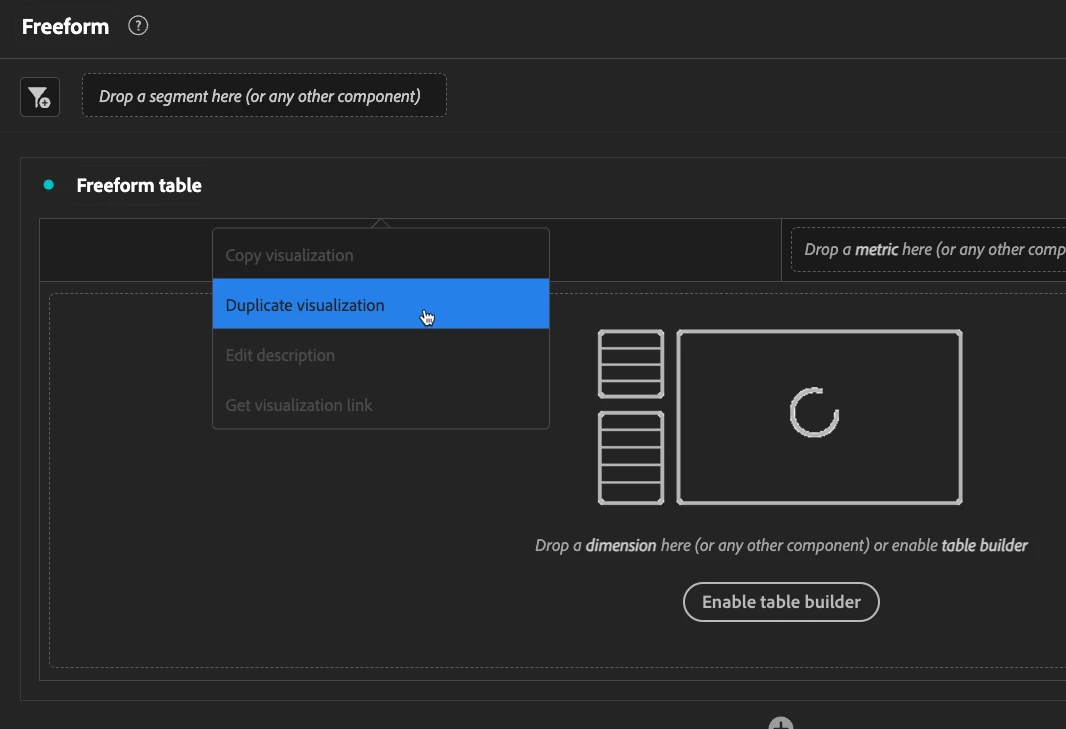
You can see when you right click on any table, the resulting dropdown is transparent.  In some cases, this is really hard to see when overlapping with something else beneath it.  


Might just be with dark mode?  


This is not consistently happening and seems to only occur when starting a new report in Workspace.  


This post is no longer active and is closed to new replies. Need help? Start a new post to ask your question.
Best answer by Nick_Walter

I've had a bit of something similar in CJA recently. a dropdown menu being under the table directly below it for example.

It hasn't been enough to cause any concern but if it is more frequent for you, I'm sure Adobe would like to know so they can look into it.

2 replies

Jennifer_Dungan
New Participant
April 13, 2024

Oooh.. that is odd! I am not seeing that, but I am in light mode... When I switch to dark mode however, yup.. I see the same thing! So it's not just you.


Definitely log a bug for that one!

Damonwhall
Employee
April 15, 2024

Case #E-001213143

Nick_Walter
Nick_WalterAccepted solution
New Participant
April 13, 2024

I've had a bit of something similar in CJA recently. a dropdown menu being under the table directly below it for example.

It hasn't been enough to cause any concern but if it is more frequent for you, I'm sure Adobe would like to know so they can look into it.