Possibility to manually reorder rows in a Workspace Freeform Table | Community
Skip to main content
New Participant
November 14, 2018
Declined

Possibility to manually reorder rows in a Workspace Freeform Table

  • November 14, 2018
  • 6 replies
  • 11746 views

When one has, for example, a number of metrics in the left side column under each other, it would be useful to be able to drag them up and down in order to change the order of them. There is a sort arrow but that only gives an alphabetic sort A-Z or Z-A on the names. See screenshot:
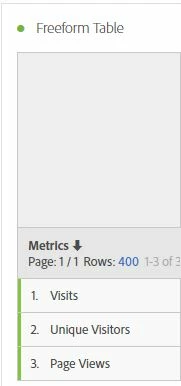
So the idea would be to take, in this case, 'Unique Visitors', and drag it above 'Visits' for example. Off course the whole row to the right of the metric would move with it. This possibility to manually order the leftmost column would give the table more flexibility. Clicking the 'Sort' arrow could reset the ordering to one of the 2 predefined possibilities (A-Z or Z-A).

6 replies

New Participant
May 15, 2020

Was option 2 solved?--Ignore. wrong thread. won't let me delete

Gigazelle
Employee
February 7, 2019

You are welcome to leave it up - it might help others who search for ideas and come across this one.

New Participant
February 7, 2019

OK - thank you for notifying me

Should I delete my post or is it ok that it stays archived? No problem with deleting it.

Gigazelle
Employee
February 6, 2019

You are absolutely right - thank you for the correction! Copy/pasting is hard sometimes.

Andrew_Wathen_
New Participant
February 6, 2019
Gigazelle
Employee
February 6, 2019

Marking as a duplicate of Possibility to manually reorder rows in a Workspace Freeform Table - please show your support there!