Provide YOY multi line chart visualizations in Workspace | Community
Skip to main content
srujanam558322
New Participant
November 16, 2018
New

Provide YOY multi line chart visualizations in Workspace

  • November 16, 2018
  • 2 replies
  • 3418 views

Hi Adobe,

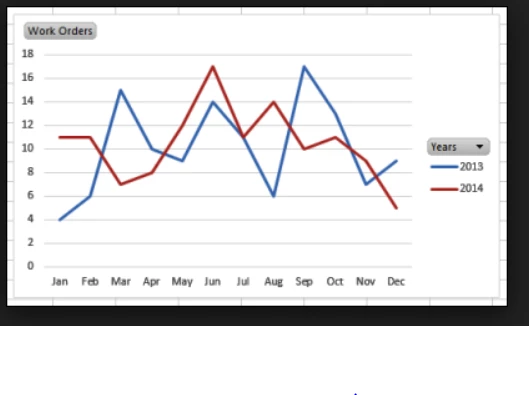
It will be great to have some year over year comparison visualizations option available in Adobe Analytics Workspace as shown in the below image. This will help users/execs better understand and compare the trends over the same time previous years. Currently we are having to extract Adobe data in to BI tools like Domo or Tableau to build such charts.
Thanks,

Srujana

- https://rnd.aspencore.com/eetimes-redesign-adtest/

2 replies

New Participant
April 21, 2021

@srujanam558322 @michaelharrison37 

If you need to import Adobe analytics data in Tableau, Daexus built a free web data connector.

  • no sign-up required
  • no download 
  • ultra secure as data doesn't go through external server - from Adobe Analytics straight to your computer.

To access it, paste the link in Tableau and start brining your data.

The paid version enables date expressions and automated data imports.

Access the link on their website 

MichaelHarrison37
New Participant
December 10, 2018

This is possible currently, though it's not immediately obvious and could be a lot better. Just right click on a column and choose "Add time period column". Then you can manually ensure that the two columns are included in your trend visualization.

It sure would be nice, though, to just be able to add something like this to a line chart without adding it to the table. And to have it normalized and automatically updated.