Rule not met causing issue | Community
Skip to main content
pradeep_07
New Participant
September 25, 2020
Solved

Rule not met causing issue

  • September 25, 2020
  • 2 replies
  • 1450 views

Hi Everyone,


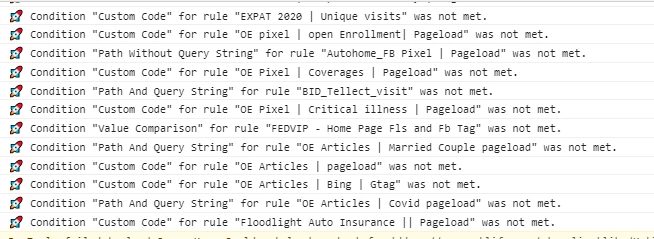
We are using adobe launch to implement third party tags such as facebook,twitter, linkedIN etc. We are seeing this rule not met (these rules are meant for different page) is firing and causing performance issue to the site. How do we avoid this firing in other pages.

Thanks,

Pradeep

This post is no longer active and is closed to new replies. Need help? Start a new post to ask your question.
Best answer by yuhuisg

(This question is probably more suitable at https://experienceleaguecommunities.adobe.com/t5/adobe-experience-platform-launch/qa-p/experience-platform-launch-questions.)

I think the error messages tell you everything that you need to know: in all of those Rules, you have specified some conditions. And each time, one or more of those conditions are not evaluating to "true" when the Rule runs.

So your solution is simple:

  1. Open the Rule.
  2. For each condition:
    1. Evaluate when the condition returns true.
  3. Refer back to your website when you get this error.
  4. Check the data elements that are referenced in the conditions. Are they what you expect them to be?
  5. If your condition is some Custom Code, debug the code to figure out why it's not returning "true".

There's no magic, one-step solution to your problem. This is akin to programming: you need to troubleshoot the problem step by step until you get to the solution.

2 replies

yuhuisg
yuhuisgAccepted solution
New Participant
September 26, 2020

(This question is probably more suitable at https://experienceleaguecommunities.adobe.com/t5/adobe-experience-platform-launch/qa-p/experience-platform-launch-questions.)

I think the error messages tell you everything that you need to know: in all of those Rules, you have specified some conditions. And each time, one or more of those conditions are not evaluating to "true" when the Rule runs.

So your solution is simple:

  1. Open the Rule.
  2. For each condition:
    1. Evaluate when the condition returns true.
  3. Refer back to your website when you get this error.
  4. Check the data elements that are referenced in the conditions. Are they what you expect them to be?
  5. If your condition is some Custom Code, debug the code to figure out why it's not returning "true".

There's no magic, one-step solution to your problem. This is akin to programming: you need to troubleshoot the problem step by step until you get to the solution.

Andrey_Osadchuk
New Participant
September 25, 2020

Could you elaborate what performance issue you are referring to?