Schedule File Export is not working for future dates from Adobe Analytics Workspace. | Community
Skip to main content
New Participant
April 22, 2025
Solved

Schedule File Export is not working for future dates from Adobe Analytics Workspace.

  • April 22, 2025
  • 1 reply
  • 733 views

Hi,

I am facing issues while scheduling file export for a later date.

The ask is to schedule a Workspace report from starting from June every 90 days.

I am trying to set it up by using the below option from Share > Schedule File Report.
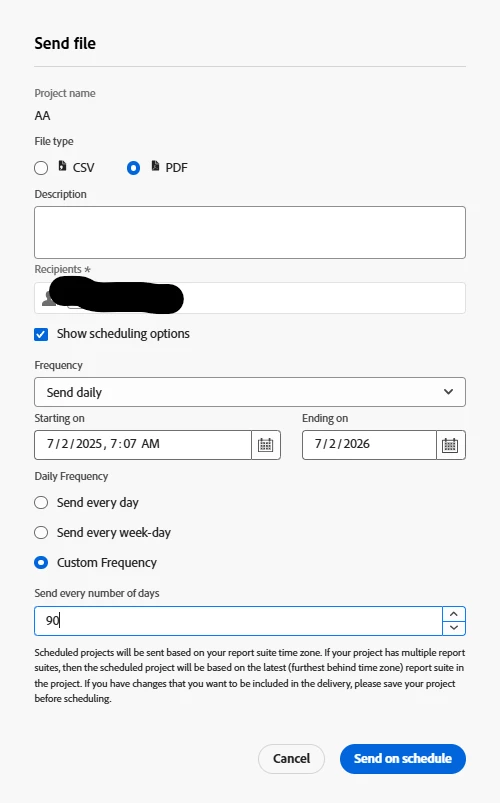
 

It is showing me the below error while I am trying to hit "Send on Schedule"

 

If I try to set it from today onwards it is getting saved, but the above error appears if we try to select future dates.

I wanted to know is there anything I am missing out on? And are we not allowed to schedule reports later with a custom frequency in Adobe Workspace?

Best answer by FarazHusain

The daily deliveries expire in a month, so in this case, if you use custom frequency set to 90 days, it won't work. It will work with 31 but not 90.

1 reply

New Participant
April 22, 2025

Have you tried using the same future start date but an end date that is within a year of today? According to the documentation, "The end date must be within a year from the day the schedule is created or modified." In your case, this means a July 7, 2025, start date and an end date of something like April 21, 2026.

SoumyaMi1Author
New Participant
April 22, 2025

Hi @brentrad ,

Thank you for the above suggestion. 

However I tried to adjust the end date within a year of today April 21, 2026. The issue still persists with the below combination.


Regards,

Soumya

FarazHusain
FarazHusainAccepted solution
Employee
April 22, 2025

The daily deliveries expire in a month, so in this case, if you use custom frequency set to 90 days, it won't work. It will work with 31 but not 90.