Secure Cookies? HttpOnly; secure | Community
Skip to main content
Level 4
Jun 6, 2019 11:47 AM UTC
Solved

Secure Cookies? HttpOnly; secure

Hello,

our servers are prepared for transaction testing.

Now the IT department said we need to switch the cookie from Adobe Analytics/ Adobe Tag Manager to Secure.

It's about the following:

Set cookie: CookieName=value; path=/; HttpOnly; secure

Quelle:

https://en.wikipedia.org/wiki/Secure_cookie

https://wiki.selfhtml.org/wiki/Grundlagen/sichere_Cookies

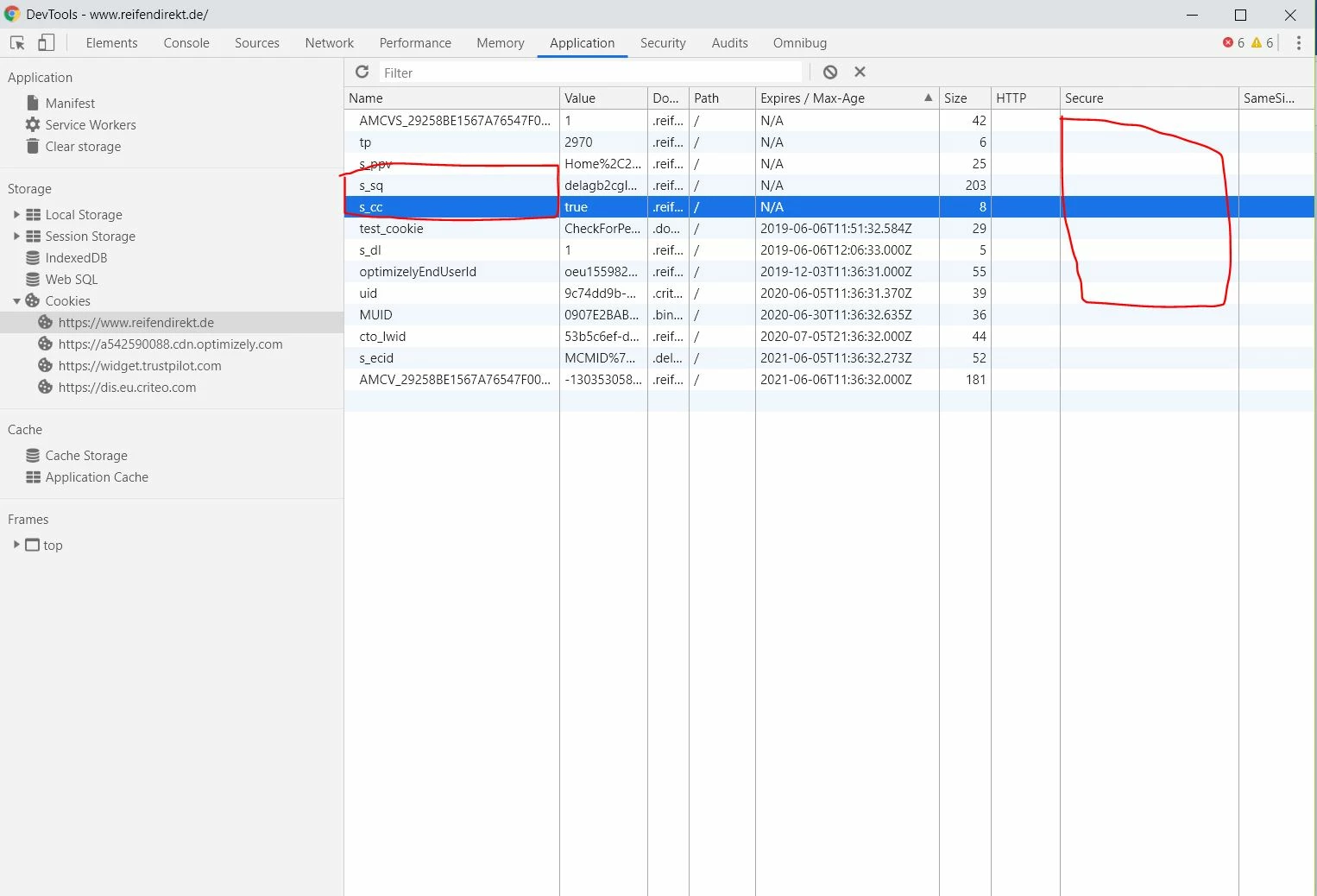
How do I set the cookie to Secure?

Example

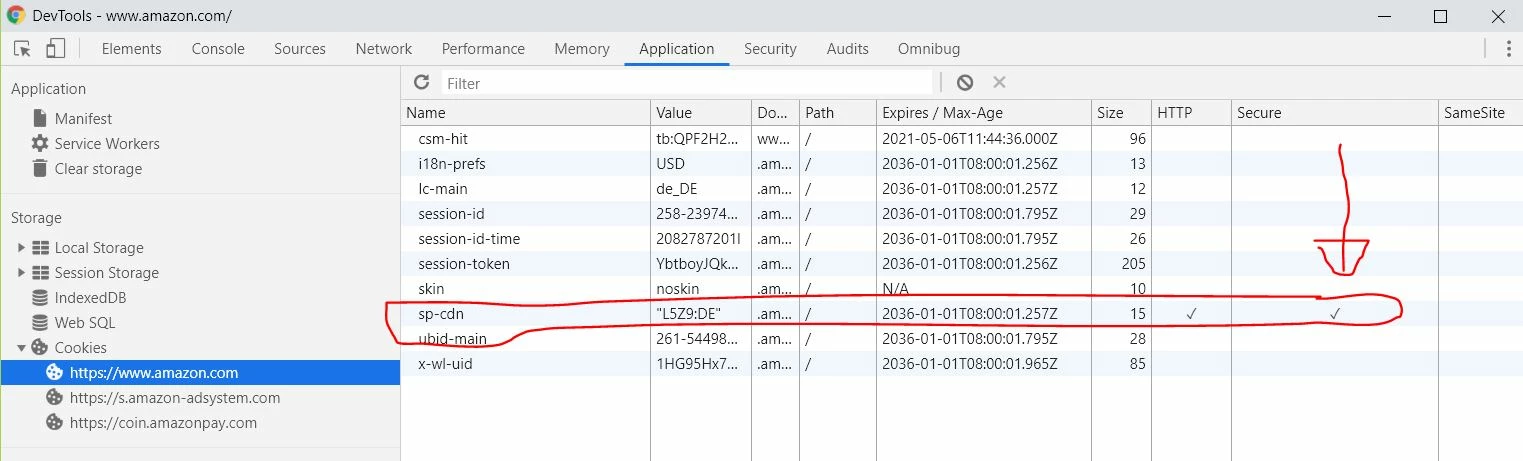
At Amazon, some cookies go as safe.

This post is no longer active and is closed to new replies. Need help? Start a new post to ask your question.
vitalin58577727Accepted solution
Level 4
Jun 17, 2019 6:54 AM UTC

Solutions

Many thanks to everyone together,

One of them was to overwrite all cookies.

function setCookieSecure(name,value,days,domain) {

var expires = "";

if (days) {

var date = new Date();

date.setTime(date.getTime() + (days*24*60*60*1000));

expires = "; expires=" + date.toUTCString();

}

document.cookie = name + "=" + (value || "")  + (expires || "") + "; path=/; domain=" + domain +"; secure";

}

var unsecureCookies = [

{

'matchNameRgxp' : new RegExp( '^AMCV_.*$' ),

'expire' : 731

},

{

'matchNameRgxp' : new RegExp( '^AMCVS_.*$' ),

'expire' : null

},

{

'matchNameRgxp' : new RegExp( '^tp$' ),

'expire' : null

},

{

'matchNameRgxp' : new RegExp( '^adb_mc$' ),

'expire' : null

},

];

if (document.cookie && document.cookie != '') {

var domain = window.location.hostname;

domain = domain.replace(/(www2|www)?/i, '');

var split = document.cookie.split(';');

for (var i = 0; i < split.length; i++) {

var name_value = split[i].split("=");

name_value[0] = name_value[0].replace(/^ /, '');

var cookieName = name_value[0];

var cookieValue = name_value[1];

for (var j = 0; j < unsecureCookies.length; j++) {

var unsecureCookie = unsecureCookies[j];

if( cookieName.match( unsecureCookie.matchNameRgxp ) ) {

setCookieSecure(cookieName, cookieValue, unsecureCookie.expire, domain);

}

}

}

}

The upper solution overwrites all cookies, from Adobe.

And a solution sent to me by the Adobe team.
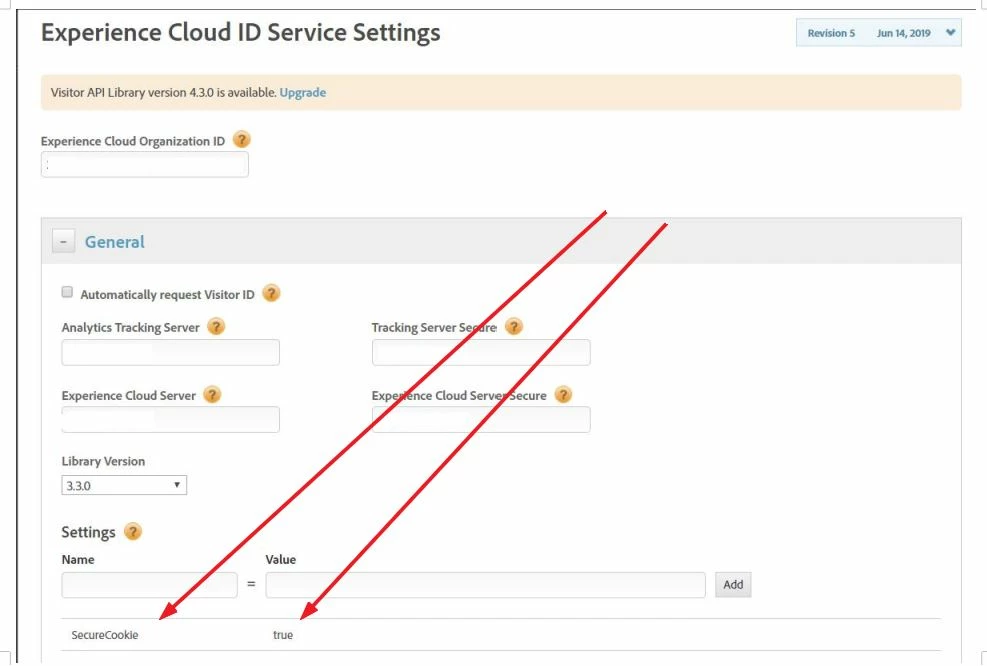
Das sollte funktionieren.
10 replies

Gigazelle
Employee
Apr 29, 2020 9:13 PM UTC

A recent update to AppMeasurement now allows this attribute natively. Check out the writeSecureCookies variable:

https://docs.adobe.com/content/help/en/analytics/implementation/vars/config-vars/writesecurecookies.html

Translate
pradeep_07
Level 4
Jan 6, 2021 7:14 PM UTC
@gigazelle I did check the securecookies checkbox and added the custom code . But I still see cookies like AMCV and AMCVS are not sucured.
Translate
vitalin58577727AuthorAccepted solution
Level 4
Jun 17, 2019 6:54 AM UTC

Solutions

Many thanks to everyone together,

One of them was to overwrite all cookies.

function setCookieSecure(name,value,days,domain) {

var expires = "";

if (days) {

var date = new Date();

date.setTime(date.getTime() + (days*24*60*60*1000));

expires = "; expires=" + date.toUTCString();

}

document.cookie = name + "=" + (value || "")  + (expires || "") + "; path=/; domain=" + domain +"; secure";

}

var unsecureCookies = [

{

'matchNameRgxp' : new RegExp( '^AMCV_.*$' ),

'expire' : 731

},

{

'matchNameRgxp' : new RegExp( '^AMCVS_.*$' ),

'expire' : null

},

{

'matchNameRgxp' : new RegExp( '^tp$' ),

'expire' : null

},

{

'matchNameRgxp' : new RegExp( '^adb_mc$' ),

'expire' : null

},

];

if (document.cookie && document.cookie != '') {

var domain = window.location.hostname;

domain = domain.replace(/(www2|www)?/i, '');

var split = document.cookie.split(';');

for (var i = 0; i < split.length; i++) {

var name_value = split[i].split("=");

name_value[0] = name_value[0].replace(/^ /, '');

var cookieName = name_value[0];

var cookieValue = name_value[1];

for (var j = 0; j < unsecureCookies.length; j++) {

var unsecureCookie = unsecureCookies[j];

if( cookieName.match( unsecureCookie.matchNameRgxp ) ) {

setCookieSecure(cookieName, cookieValue, unsecureCookie.expire, domain);

}

}

}

}

The upper solution overwrites all cookies, from Adobe.

And a solution sent to me by the Adobe team.

Das sollte funktionieren.
Translate
sonalid49327489
Level 2
Dec 18, 2020 6:14 AM UTC

Hi, trying to implement the same way you did trhough custom code, couldn't set secure attribute. I'm setting few cookies through s.getPreviousValue, s.getNewRepeat plugins . Is there something I need to do further

Translate
Asheesh_Pandey
New Participant
Jun 12, 2019 12:39 PM UTC

looks good to me ..thanks! once done check cookie in application tab to find it is being set as secure now.

Translate
Level 4
Jun 12, 2019 8:08 AM UTC

I have now integrated the function as follows.

Did someone look over it and say if that's OK?

Thank you in advance

Translate
Asheesh_Pandey
New Participant
Jun 7, 2019 11:14 AM UTC

That's correct you need to implement suggested code in this section, You can find your org id in experience cloud landing page. Find your ord ID

Translate
Level 4
Jun 7, 2019 6:34 AM UTC

Hello community,

I received the following answer from Adobe Team.

I would like to implement the code, but unfortunately I don't know where the Marketing ID is?

Is this the Marketing Cloud ID?

And where do I have to implement the code?

var visitor = Visitor.getInstance("2924444444444444444444@AdobeOrg",{

        //Set secure cookie property

        secureCookie: true

});

Do I have to implement the code here?

Thank you in advance

Vitali

Translate
Asheesh_Pandey
New Participant
Jun 6, 2019 11:18 PM UTC

Hey Vitalin,

This s_sq cookie is for activity map (the previous link clicked) and s_cc is to read by the JavaScript code to determine if cookies are enabled.

Here is more info - Analytics Cookies

Thanks,

Asheesh

Translate
pradeep_07
Level 4
Jan 14, 2021 4:44 PM UTC
anyone know how to set http to secure ? is that possible at all ?
Translate