Segment Created - Include - IP Address Range - Please Verify | Community
Skip to main content
New Participant
July 17, 2018
Solved

Segment Created - Include - IP Address Range - Please Verify

  • July 17, 2018
  • 3 replies
  • 3777 views

Hi Guys,

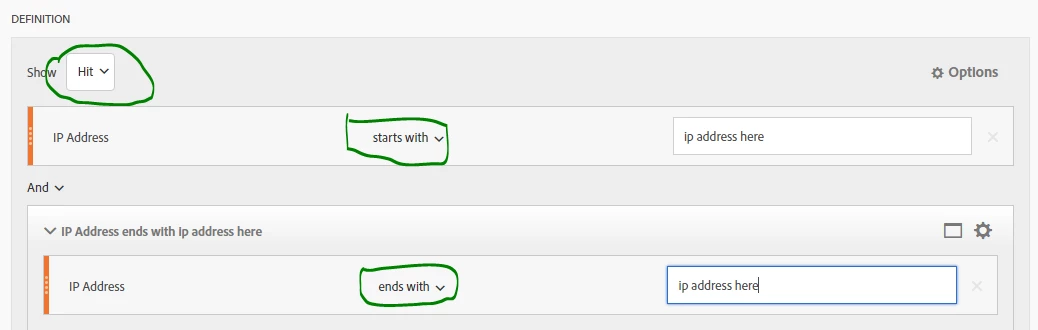
I have a requirement to include IP address range (not exclude IP) in a segment to understand the traffic.

Please find the attached screenshot has the segment details. Please let me know if my segment works ?

Thanks,

PV
This post is no longer active and is closed to new replies. Need help? Start a new post to ask your question.
Best answer by Pablo_Childe

yes...

SO...

192.1.11.1

Would cover range:

192.1.11.100-192.1.11.199

Hit would capture all pages hit by the IPs only so in principle is fine. I prefer in this case visit based metric as it allows for more visit based metrics and evars to be reported on. Both will work but depends on subsequent reports you plan to run.

use OR if you plan to have more than 1 IP being looked at

192.1.11.1

OR

192.2.11.1

OR

192.4.11.1

3 replies

Pablo_Childe
Pablo_ChildeAccepted solution
New Participant
July 17, 2018

yes...

SO...

192.1.11.1

Would cover range:

192.1.11.100-192.1.11.199

Hit would capture all pages hit by the IPs only so in principle is fine. I prefer in this case visit based metric as it allows for more visit based metrics and evars to be reported on. Both will work but depends on subsequent reports you plan to run.

use OR if you plan to have more than 1 IP being looked at

192.1.11.1

OR

192.2.11.1

OR

192.4.11.1

prathiv23Author
New Participant
July 17, 2018

Thanks pabloc82923542

Few points to note:

  1. I knew the IP address details ie . range from and to IP address. Since I know the complete IP address, can i use something like 192.1.11.1 under the option 'Starts With' - I meant the entire IP address?
  2. I believe if we use 'IP address' , we need to use 'hit' as the metric. Please correct me If I'm wrong.
  3. I think I should change the condition to 'OR' instead of 'AND' as I knew the IP range

The idea is to understand how internal users ie. employees are accessing the website.

Thanks,

PV

Pablo_Childe
New Participant
July 17, 2018

I would just use hit if you are looking at specific pages traffic.

If you are trying to understand all traffic from IP(s) then use visit as base.

Also for an IP range use "Starts with" the use your first 3 digits like:

192.1.1.11

or wider

192.1.1.1

etc..

If its just 2 or 3 depends on how small subnet you want then do multiple lines and use OR in between them.

good luck